Best AI Productivity Tools for Employees in 2026: Features, Benefits & Time-Saving Potential
In today's fast-moving workplace, productivity is no longer about working longer hours. Instead, it's about working smarter and leveraging technology to eliminate unnecessary tasks.
Many professionals start their day with ambitious goals and a carefully planned schedule. However, before they know it, their time is consumed by endless emails, back-to-back meetings, spreadsheet updates, document reviews, and administrative work. By the afternoon, very little meaningful work has been completed.
Research consistently shows that employees spend a significant portion of their workday on what experts call "work about work"—tasks that support work but don't directly contribute to business growth or innovation.
Fortunately, artificial intelligence is transforming the modern workplace. AI-powered tools are helping professionals automate repetitive tasks, improve communication, streamline workflows, and make better decisions faster than ever before.
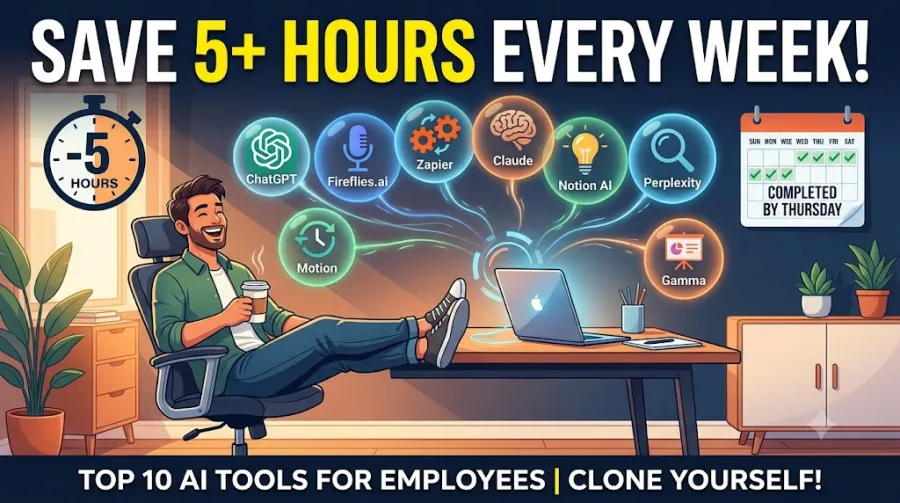
Whether you're a project manager, marketer, entrepreneur, software developer, HR professional, or administrative executive, these AI tools can help you reclaim hours every week and dramatically improve your productivity.
Why AI Productivity Tools Are Becoming Essential
Artificial intelligence is no longer a futuristic concept reserved for large technology companies. It has become a practical business tool available to everyone.
Modern AI tools can:
Draft emails and reports
Summarize meetings automatically
Organize schedules intelligently
Conduct research faster
Generate presentations instantly
Improve communication quality
Automate repetitive workflows
Instead of replacing employees, these tools enhance human productivity by handling routine work, allowing professionals to focus on strategy, creativity, and problem-solving.
Let's explore the top AI tools making the biggest impact in workplaces across the globe.
1. ChatGPT (OpenAI) – The Ultimate Workplace Assistant
Best For:
Brainstorming, content creation, document drafting, research assistance, and information processing.
Estimated Time Saved:
3–4 Hours Per Week
When discussing workplace AI tools, ChatGPT is often the first name that comes to mind. As one of the most versatile AI assistants available, it helps professionals complete a wide range of tasks quickly and efficiently.
Why ChatGPT Saves So Much Time
Instead of spending hours drafting emails, reports, proposals, or presentations, employees can provide a simple outline and receive a polished first draft within seconds.
Its advanced multimodal capabilities also allow users to:
Analyze lengthy PDF reports
Summarize complex documents
Convert handwritten notes into digital text
Extract important insights from data
For many professionals, ChatGPT functions like a dedicated research assistant available 24/7.
2. Fireflies.ai – The Automated Meeting Assistant
Best For:
Meeting recording, transcription, note-taking, and action-item tracking.
Estimated Time Saved:
2–3 Hours Per Week
Meetings are often necessary, but documenting them can be incredibly time-consuming. Fireflies.ai eliminates the burden of manual note-taking.
Turning Meetings into Searchable Knowledge
Fireflies.ai integrates with:
Zoom
Microsoft Teams
Google Meet
The platform automatically records, transcribes, and analyzes conversations in real time.
Key features include:
Automatic meeting summaries
Searchable transcripts
Timestamped discussions
Action-item extraction
Topic tracking
Instead of rewatching lengthy recordings, employees can instantly locate important information with a simple search.
3. Zapier Copilot – The No-Code Automation Expert
Best For:
Workflow automation and app integration.
Estimated Time Saved:
3–5 Hours Per Week
Repetitive digital tasks can consume a surprising amount of time. Zapier Copilot helps eliminate these inefficiencies by connecting apps and automating workflows.
Automating Everyday Processes
One of Zapier Copilot's biggest advantages is its natural language interface.
For example, you can simply tell it:
"Whenever a new lead fills out our website form, analyze their company size using AI, save the information to Google Sheets, send a personalized Gmail response, and notify the sales team on Slack."
Zapier automatically creates and tests the workflow for you.
The result is less manual work and significantly improved operational efficiency.
4. Claude (Anthropic) – The Long-Document Specialist
Best For:
Document analysis, research, and complex writing tasks.
Estimated Time Saved:
2–4 Hours Per Week
While ChatGPT excels as a general-purpose AI assistant, Claude is particularly strong when working with large volumes of text.
Processing Massive Documents with Ease
Claude's large context window allows it to analyze extensive content, including:
Legal contracts
Research papers
Technical documentation
Market analysis reports
Professionals use Claude to:
Identify inconsistencies
Summarize large documents
Simplify technical language
Improve clarity and readability
Its ability to understand nuance makes it especially valuable for detailed analytical work.
5. Notion AI – The Intelligent Knowledge Management System
Best For:
Team collaboration, documentation, and project management.
Estimated Time Saved:
2–3 Hours Per Week
Organizations generate vast amounts of internal information, and finding the right document often becomes a challenge.
Eliminating Information Overload
Notion AI helps users quickly access company knowledge by searching across an organization's entire workspace.
Employees can ask questions such as:
What are our latest brand guidelines?
Summarize last week's project updates.
What decisions were made during the last product launch?
Notion AI retrieves relevant information instantly and provides source references, dramatically reducing time spent searching for documents.
6. Perplexity AI – The Modern Research Engine
Best For:
Research, fact-checking, and market analysis.
Estimated Time Saved:
2–3 Hours Per Week
Traditional search engines often require users to sift through multiple websites before finding useful information.
Perplexity AI takes a different approach.
Faster Answers with Source Citations
Instead of presenting links, Perplexity provides direct answers generated from live web data.
Advantages include:
Real-time information
Source citations
Comprehensive summaries
Faster research workflows
For business professionals conducting competitive analysis or industry research, this can save hours every week.
7. Wisprflow.ai – Context-Aware Voice Dictation
Best For:
Voice-to-text productivity and hands-free communication.
Estimated Time Saved:
3–4 Hours Per Week
Most people can speak significantly faster than they type.
Wisprflow.ai leverages this advantage by providing intelligent voice dictation across multiple devices.
Speak Naturally, Write Faster
Unlike traditional dictation tools, Wisprflow understands natural speech patterns.
It can:
Remove filler words
Correct grammar automatically
Format text intelligently
Adapt writing style based on context
Whether writing emails, Slack messages, Jira tickets, or reports, users can communicate faster without sacrificing quality.
8. Motion – The AI-Powered Calendar Manager
Best For:
Scheduling, task management, and productivity planning.
Estimated Time Saved:
2–3 Hours Per Week
Managing calendars manually can be frustrating, especially when priorities constantly change.
Your Personal AI Scheduler
Motion automatically organizes tasks based on:
Priority level
Deadlines
Available time
Existing meetings
When unexpected events occur, Motion adjusts schedules automatically, ensuring critical work remains on track.
This dynamic scheduling capability helps professionals avoid missed deadlines and maintain productivity.
9. Gamma – The AI Presentation Builder
Best For:
Presentation creation and slide deck design.
Estimated Time Saved:
Approximately 2 Hours Per Week
Creating professional presentations often involves more design work than content creation.
Gamma changes that.
From Idea to Presentation in Minutes
Users can provide:
A topic
A rough outline
A document
A simple prompt
Gamma automatically generates professionally designed presentations complete with layouts, visuals, and structured content.
Users can then refine slides using simple natural-language instructions instead of manually adjusting formatting.
10. Grammarly – The AI Writing Coach
Best For:
Writing improvement, communication, and tone optimization.
Estimated Time Saved:
1–2 Hours Per Week
Clear communication is essential in every workplace.
Grammarly has evolved far beyond traditional spell-checking.
Improving Every Message You Send
Grammarly analyzes writing for:
Grammar
Clarity
Tone
Conciseness
Professionalism
It helps eliminate misunderstandings, improve communication quality, and reduce the need for repeated revisions.
For professionals who write frequently, Grammarly can significantly improve efficiency and communication effectiveness.
Access Free Online AI Tools
AI Productivity Tools Comparison Table
| AI Tool | Primary Strength | Weekly Time Saved |
|---|---|---|
| ChatGPT | Drafting & General Assistance | 3–4 Hours |
| Fireflies.ai | Meeting Notes & Transcriptions | 2–3 Hours |
| Zapier Copilot | Workflow Automation | 3–5 Hours |
| Claude | Document Analysis | 2–4 Hours |
| Notion AI | Knowledge Management | 2–3 Hours |
| Perplexity AI | Research & Fact-Checking | 2–3 Hours |
| Wisprflow.ai | Voice Dictation | 3–4 Hours |
| Motion | Smart Scheduling | 2–3 Hours |
| Gamma | Presentation Creation | 2 Hours |
| Grammarly | Writing Improvement | 1–2 Hours |
Build Your Personal AI Productivity Stack
Artificial intelligence is rapidly becoming an essential part of professional life. The most productive employees in the coming years won't necessarily be those who work harder—they will be those who learn how to work smarter with AI.
The good news is that you don't need to adopt every tool at once.
Start by identifying your biggest productivity challenge:
Too many meetings? Try Fireflies.ai
Struggling with writing? Use ChatGPT or Claude
Overwhelmed by scheduling? Let Motion take control
Creating presentations regularly? Give Gamma a try
Even automating just a few repetitive tasks can help you recover 5 to 10 hours every week.
That's time you can invest in strategic thinking, creative work, professional growth, or simply achieving a better work-life balance.
The future of work is already here—and these AI tools are helping professionals make the most of it.