OpenClaw 2026.9.5 Adds Safer Upgrades, Hot-Reloadable Plugins, GPT Live and Multi-Agent Teams
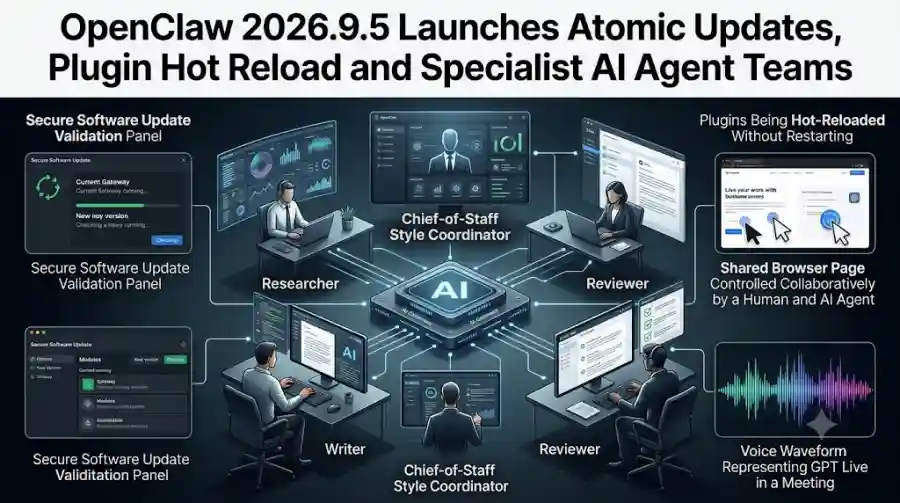
The new update system checks the next version before switching over, allowing the current Gateway to remain available while the new version is validated. OpenClaw can then switch versions and verify the updated installation before fully committing to it.
The release also makes supported plugins reloadable without restarting the Gateway, introduces guided setup for teams of specialist agents, adds read-only conversation sharing, expands GPT Live to meetings and phone calls, and lets users share a browser page with their agent.
That combination makes 2026.9.5 much more than a routine bug-fix update.
What Is OpenClaw?
OpenClaw is an open-source AI assistant designed to run on a user's own machines.
Its official website says the software works across macOS, Windows and Linux, while its Gateway connects models, tools and communication channels. The project can also use hosted models, subscription-backed models or local models through its plugin-based architecture.
Unlike a conventional chatbot website, OpenClaw is designed as an agent platform.
It can work with tools, maintain state and memory locally, interact through messaging platforms and perform multi-step tasks.
The 2026.9.5 release continues that direction by making the underlying system easier to operate continuously.
Atomic Updates Are the Headline Feature
The biggest operational change in OpenClaw 2026.9.5 is Atomic Updates.
Software updates can be risky for systems that need to stay online.
If an AI Gateway goes offline during an update, the assistant can become unavailable exactly when a user needs it. A failed upgrade can also create a harder recovery problem if the new version has already replaced the old installation.
OpenClaw's new update process tries to reduce that failure mode.
How Atomic Updates Work
On supported update paths, OpenClaw first checks the proposed version against a private copy of the setup while the existing Gateway continues running.
After validation, the system switches to the updated version and performs additional verification.
If something goes wrong, recovery can restore the previous version when the existing data and configuration remain compatible.
The important concept is that the currently working agent remains available during the validation stage.
This changes the update workflow from:
Stop → Update → Hope It Works
to something closer to:
Keep Running → Validate Candidate → Switch → Verify → Recover When Necessary
That is particularly relevant for people running OpenClaw as an always-on assistant.
OpenClaw Warns Users About Database Rollbacks
Atomic Updates do not mean users can safely ignore backups.
OpenClaw's documentation explicitly warns that application rollback cannot undo database migrations.
Version 2026.9.5 upgrades agent databases to schema 21, and older builds cannot open the updated format. Going back therefore requires the matching older build and an appropriate backup that includes the relevant database state.
The documentation also states that the private validation copy is not a backup.
That is an important distinction.
Atomic Updates are designed to make the software-update process safer, but users still need proper backups before major changes.
For anyone running valuable long-term conversations or agent state, that recommendation matters.
Plugins Can Now Be Reloaded Without Restarting the Gateway
Another major improvement is live plugin management.
Previously, adding or changing plugins could require restarting the Gateway.
In 2026.9.5, supported plugins can be installed or reloaded while the Gateway continues running. Owners can perform these actions from the command line or through authorized chat commands.
The feature is designed to make OpenClaw more modular.
A user can add an integration or try a supported plugin without taking the entire agent installation offline.
OpenClaw's Plugins UI can also help users discover official and ClawHub packages.
Existing permission and consent requirements remain in effect.
Multiple Plugins Can Be Managed Together
The new CLI workflow can also handle several plugins in a single enable, disable, reload, update or uninstall command.
If one operation succeeds and another later operation fails, OpenClaw preserves the earlier successful changes and reports the remaining issue.
That makes plugin administration more practical for users operating larger installations.
OpenClaw Adds Guided Specialist AI Agent Teams
OpenClaw 2026.9.5 also expands its multi-agent capabilities.
The new onboarding workflow can create a specialist or a small team of specialized agents.
The official documentation gives a preset containing four roles:
- Chief of staff
- Researcher
- Writer
- Reviewer
Users can also choose an individual specialist instead of creating the full team. OpenClaw presents the team as a proposal that the user can approve before the agents are created.
This is a notable change because it makes multi-agent setup more accessible.
Instead of manually creating separate agents and assigning every role, users can start with a predefined collaborative structure.
Why Specialist Agent Teams Matter
Different AI tasks often require different instructions and tools.
A research agent may need browsing and source-analysis tools.
A writing agent may need document access.
A reviewer may need to inspect results rather than generate new material.
A coordinator can then manage how those specialists work together.
OpenClaw's new onboarding workflow is designed around that structure.
The setup can create the specialist team through the Control UI, and OpenClaw's command-line onboarding can also create the same team configuration.
The user still controls the setup rather than having an AI system silently create agents.
The Web UI Gets an Agent Overview
The release also improves the web interface for people managing multiple agents.
OpenClaw adds an Agents overview that brings recent activity and conversation previews together.
Users can optionally display a team sidebar that groups conversations by agent.
This makes it easier to understand which agent is currently working, inspect recent activity and return to the appropriate conversation.
The system also keeps delegated subagent work associated with its parent conversation rather than allowing internal activity to overwhelm the main conversation list.
That becomes increasingly important as multi-agent workflows become more common.
Shared Browser Pages Let Humans and Agents Work on the Same Screen
Another useful addition is the shared Browser dashboard.
The feature allows a user and an OpenClaw agent to work with the same browser page.
A user can change a filter, enter a note or otherwise modify the page and then ask the agent to continue from the resulting state.
This is different from simply asking an AI agent to open a website independently.
The user and agent share a common browser context managed by OpenClaw.
Browser Sharing Has Security and Compatibility Limits
OpenClaw says the shared browser uses a local, OpenClaw-managed browser profile and that profile's login state.
It does not use the cookies from the user's ordinary laptop or phone browser.
Remote profiles, paired-node browsers and attached personal browsers are unsupported for this particular workflow.
That separation is important because browser automation can expose highly sensitive information.
Users should therefore understand which browser profile is being used before allowing an agent to interact with authenticated services.
GPT Live Comes to Meetings and Phone Calls
Voice capabilities also receive a substantial expansion.
OpenClaw 2026.9.5 brings GPT Live to Talk, supported meetings and phone calls.
The official documentation says users can speak while GPT Live replies in supported Google Meet, Microsoft Teams and Zoom meetings, and the system can also consult the OpenClaw agent during meetings or phone calls.
This moves OpenClaw beyond text-based agent interaction.
A meeting can now become another environment where an AI system participates in the workflow.
For example, an agent could be used to assist with a meeting-related task while the user continues communicating through voice.
GPT Live Is Audio-Only in This Workflow
OpenClaw notes an important limitation: GPT Live is audio-only for these surfaces.
The documentation recommends another model when camera input is required.
It also says users must explicitly select Live for meetings and calls rather than having it silently activate.
These controls help separate ordinary assistant interaction from a live voice session.
Users Can Change the Voice During a Call
The release also adds greater flexibility for voice interaction.
Users can ask the assistant to change its speaking voice during supported Talk calls or use a browser-based voice picker.
Supported Discord calls can also switch voices during an active call.
The conversation remains intact while the voice changes, although the session briefly reconnects.
This is another sign that OpenClaw is treating voice as a first-class agent interface rather than a simple text-to-speech feature.
Conversation Sharing Is Now Read-Only
OpenClaw also introduces Session Share, which allows selected conversation groups to be shared with teammates on another paired OpenClaw installation.
The recipient gets read-only access.
They can see conversation text and eligible user-created forks, but they cannot continue the conversation, archive it or use its terminal.
That makes the feature useful for collaboration without automatically transferring control of the agent.
However, OpenClaw also warns that users should choose shared conversations carefully because text and metadata may contain private information.
Revoking access cannot undo information that someone has already received.
Conversation Archiving Helps Control Storage
Long-running AI assistants can accumulate large conversation databases.
OpenClaw 2026.9.5 adds a conversation-archiving workflow designed to reduce storage pressure while keeping older conversations available.
Inactive history can be compressed and reopened later.
Settings also show how much storage each agent's conversations are using.
Cold storage is disabled by default, but users can enable automatic archiving for eligible inactive history.
Archived conversations can later be restored and made searchable again.
This is particularly useful for people who run OpenClaw continuously and accumulate months of agent conversations.
OpenClaw Keeps State and Credentials on Your Hardware
OpenClaw's broader architecture remains focused on local control.
Its official site says state lives on the user's machine rather than in a vendor-controlled cloud, while model providers and chat platforms can be connected according to the user's configuration.
The project's npm documentation similarly describes OpenClaw as an open-source AI assistant that runs on personal computers, with state, memory and credentials kept on the user's hardware.
That local-first model is one reason the reliability improvements in 2026.9.5 matter.
An always-on local agent needs dependable updates, predictable plugin management and manageable storage.
OpenClaw Supports Multiple Operating Systems
OpenClaw's official site currently lists applications for:
- macOS
- Windows
- Linux
The website shows the latest macOS release at v2026.9.5, while Windows is shown at a closely related release version and Linux provides 2026.9.5 AppImage and Debian packages.
The project also provides a command-line installation path.
This makes OpenClaw accessible across desktop environments rather than tying the agent to a single operating system.
What Makes OpenClaw Different From a Standard AI Chatbot?
A traditional chatbot is primarily a conversation interface.
OpenClaw is closer to an AI operating layer.
It combines:
Models + tools + memory + agents + browser automation + plugins + communication channels
That architecture explains why a release such as 2026.9.5 contains improvements across so many different areas.
The product is not only concerned with generating better answers.
It has to manage software updates, sessions, permissions, tools, agent teams, browser state, plugins and long-term conversation data.
OpenClaw 2026.9.5 vs Earlier Versions
| Feature | Earlier OpenClaw | OpenClaw 2026.9.5 |
|---|---|---|
| Update validation before switching | More limited | Atomic Updates |
| Plugin installation | Restart often required | Supported plugins can hot reload |
| Specialist agent teams | More manual setup | Guided team setup |
| Browser collaboration | More limited | Shared browser pages |
| GPT Live meetings | Not broadly available | Supported |
| GPT Live phone calls | Not broadly available | Supported |
| Conversation sharing | More limited | Read-only Session Share |
| Conversation archiving | More limited | Built-in archival controls |
| Agent management | Basic overview | Improved Agents overview |
The release therefore combines reliability improvements with a wider set of agent-oriented workflows.
Who Should Use OpenClaw 2026.9.5?
The update is particularly relevant to users who treat OpenClaw as a continuously running assistant rather than a one-off experiment.
Local AI Enthusiasts
Users who prefer running AI systems on their own machines can take advantage of OpenClaw's local-first architecture.
Developers
The plugin ecosystem, CLI tools and coding-app integrations make OpenClaw useful for developer workflows.
Multi-Agent Users
People experimenting with specialist agents can now create predefined teams more easily.
Researchers and Writers
The new specialist-agent presets can separate research, writing and review responsibilities.
Power Users Running Always-On Assistants
Atomic Updates, plugin hot reload and conversation archiving are especially relevant for long-running installations.
What Users Should Know Before Upgrading
The new update workflow is safer, but users should still approach upgrades carefully.
OpenClaw explicitly recommends creating and verifying a backup before upgrading because the 2026.9.5 database changes can prevent older versions from opening the updated data.
Users should also review connected plugins and permissions.
Hot reload reduces downtime, but it does not remove authorization and consent requirements.
Likewise, shared conversations and browser sessions can contain sensitive information, so access should be configured deliberately.
OpenClaw 2026.9.5 is one of the project's more substantial releases because it improves both what the agent can do and how reliably the agent can stay online.
The headline feature, Atomic Updates, addresses a practical problem that becomes more important as AI assistants become persistent systems rather than temporary chat sessions. The current Gateway can stay active while a proposed update is validated, with recovery available when the new version fails under supported conditions.
At the same time, live plugin management makes OpenClaw easier to extend without repeatedly restarting the entire system.
The new specialist-agent setup pushes OpenClaw further toward multi-agent workflows, while shared browser pages create a more direct human-and-agent collaboration model.
GPT Live support for meetings and phone calls expands the agent's interaction surface again.
And conversation archiving, session sharing and better agent management address the practical problems created when an AI assistant is used continuously.
The larger story behind this release is that OpenClaw is evolving from a local AI assistant into a broader agent platform for persistent, tool-using and multi-agent workflows.
As users connect more models, plugins, browsers, messaging channels and specialist agents, reliability becomes just as important as raw model capability.
OpenClaw 2026.9.5 is built around that transition.
Frequently Asked Questions
What is OpenClaw 2026.9.5?
OpenClaw 2026.9.5 is a major release of the open-source AI assistant, adding Atomic Updates, hot-reloadable plugins, specialist agent teams, shared browser workflows, GPT Live support and conversation management improvements.
What are Atomic Updates in OpenClaw?
Atomic Updates validate a proposed OpenClaw version against a private copy while the current Gateway keeps running, then switch and verify the new version. Recovery can restore the previous version when the data and configuration remain compatible.