Perplexity Brings Its Local AI Agent to Windows With 24GB RTX GPU Requirement
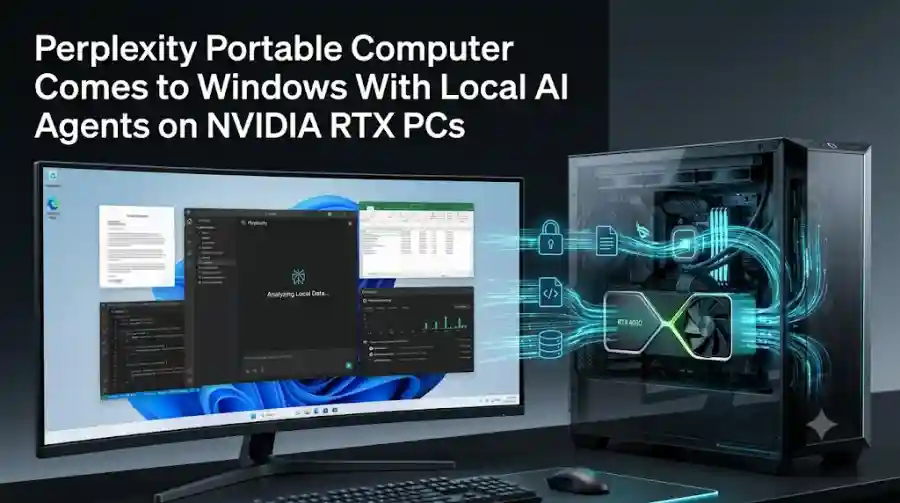
NVIDIA says locally completed work does not consume Perplexity Computer credits, while tasks requiring more advanced reasoning can be escalated to cloud models after the user gives permission.
That makes the Windows release particularly relevant to the growing market for local and hybrid AI agents.
What Is Perplexity Portable Computer?
Portable Computer is designed to bring Perplexity's agentic Computer experience onto local hardware.
Rather than operating only as a chatbot, the system can plan and execute multi-step tasks.
It can analyze information, work with files, use connected applications and handle recurring workflows.
The local architecture is designed around keeping sensitive information on the user's machine.
According to NVIDIA, Portable Computer can use local models to analyze data, combine information from different files and manage recurring work without requiring those workflows to be processed entirely in the cloud.
This is different from a conventional cloud AI assistant.
A user can provide the agent with private documents or local business data, allowing the system to work with that information on the PC.
For tasks that require capabilities unavailable locally, the agent can request permission before sending information to cloud services.
Windows Support Expands Local AI Access
Portable Computer originally launched as a local-first AI experience on NVIDIA's DGX Spark and later expanded toward RTX hardware.
The Windows release now makes the technology available through the Perplexity Windows app on supported NVIDIA hardware.
The company is therefore positioning Portable Computer as part of the existing Perplexity application rather than requiring users to install an entirely separate AI-agent platform.
The release supports both NVIDIA GeForce RTX PCs and NVIDIA RTX PRO Workstations.
However, there is an important hardware requirement.
You Need at Least 24GB of VRAM
The biggest limitation of the Windows release is its GPU requirement.
Perplexity Portable Computer requires an NVIDIA GeForce RTX or RTX PRO GPU with at least 24GB of VRAM for local operation.
That immediately puts the Windows version into a high-end hardware category.
An ordinary Windows laptop or desktop with an RTX GPU does not automatically qualify. The GPU must meet the 24GB VRAM requirement.
NVIDIA says support for its DGX Station is also expected in the future.
This requirement reflects the computational demands of running an agentic AI system locally rather than simply accessing an AI model through a remote server.
How Local AI Works in Portable Computer
The main difference between Portable Computer and a traditional cloud AI assistant is where processing happens.
When a supported local workflow runs, the agent can use the computer's NVIDIA GPU and local model infrastructure.
That allows private files and information to remain on the machine during local processing.
NVIDIA describes the system as combining local and cloud AI within one application.
This creates a hybrid workflow.
Local Processing
Tasks that can be handled by the local system can stay on the PC.
This can include analyzing files, processing local information and carrying out certain recurring workflows.
Locally completed work does not consume Perplexity Computer credits, according to NVIDIA.
Cloud Escalation
Some tasks may require more advanced reasoning or web-based research.
In those cases, Portable Computer can identify that additional cloud capabilities are required.
Importantly, the system asks the user for permission before sending information off the device, according to NVIDIA.
That gives users an explicit decision point between keeping a workflow local and allowing cloud processing.
Portable Computer Connects to Everyday Apps
Local AI becomes considerably more useful when it can work with the applications people already use.
NVIDIA says Portable Computer supports connectors for:
- Microsoft Outlook
- OneDrive
- Microsoft Word
- Google Drive
- Gmail
- Slack
- GitHub
These integrations allow the agent to operate across documents, communications and development workflows.
Instead of simply answering a question about a document, an AI agent can potentially analyze information and then use a connected application as part of the workflow.
That is where the product moves closer to an AI coworker rather than a conventional chatbot.
What Can Perplexity Portable Computer Do?
Perplexity and NVIDIA have highlighted several examples of how Portable Computer can be used.
Code and Software Development
Developers can connect a GitHub project and ask the agent to review open pull requests.
The system can organize issues by status, identify potential next steps and flag outdated documentation.
It can also prepare proposed documentation updates for review.
The local processing model is particularly relevant for developers working with private codebases.
Financial Document Analysis
Portable Computer can also analyze financial documents stored on a computer.
NVIDIA gives an example involving brokerage summaries, tax documents and other financial records.
The agent can analyze the documents and identify recurring holdings or fees while citing figures back to the relevant file and page.
Because the workflow can run locally, the example is aimed at reducing the need to send sensitive financial documents to a remote chatbot.
Business Data Analysis
Another example involves startup data.
A user can provide customer or activation information and ask the agent to analyze where users are dropping out of a funnel.
The agent can process the data locally and then send relevant findings to a connected Slack channel.
This demonstrates the broader concept behind Portable Computer: local processing combined with actions in connected services.
A Local AI Agent, Not Just a Local Chatbot
One of the most important aspects of Portable Computer is that Perplexity is not presenting it simply as a local chatbot.
The product is built around agentic workflows.
An ordinary local chatbot might answer questions about a file.
An agent can potentially inspect multiple sources, reason about the information, perform actions and complete a sequence of tasks.
Portable Computer is designed around that second model.
Perplexity's original announcement described the system as a local version of Computer capable of analyzing data, synthesizing files and running complex workflows on the user's machine.
That distinction becomes increasingly important as AI software moves from answering questions toward completing tasks.
Why Local AI Matters for Private Data
Cloud AI has made advanced models widely accessible, but organizations and individuals often have information they do not want to routinely upload to external services.
This can include:
- Private source code
- Internal business documents
- Financial records
- Customer information
- Research material
- Confidential project files
Running AI locally can reduce the amount of information that needs to leave the device.
Portable Computer is designed around this model.
NVIDIA says sensitive information stays on the device during local workflows, while cloud escalation requires user authorization.
However, users should still understand the difference between local and cloud operations before approving an escalation.
A task that leaves the machine has a different privacy boundary from one that remains entirely local.
The 24GB Requirement Is the Major Barrier
The Windows launch expands availability, but the hardware requirement means Portable Computer is not aimed at every Windows PC.
A GPU with 24GB or more of VRAM is required.
That makes the product primarily relevant to high-end gaming GPUs, professional workstations and specialized AI hardware.
It also highlights one of the central challenges facing local AI agents.
As models become more capable and agents handle longer workflows, local hardware needs to provide enough memory and compute capacity to run those systems effectively.
Cloud AI remains easier to access for users without high-end hardware because the heavy computation happens remotely.
Portable Computer instead trades broader hardware compatibility for greater local control.
What Happens When a Task Needs More AI Power?
Portable Computer does not completely isolate users from cloud AI.
Instead, it combines both approaches.
If a workflow requires advanced reasoning or current web research, the local agent can ask permission to use cloud-based capabilities.
This hybrid design allows users to keep suitable tasks local while still accessing more powerful remote systems when necessary.
That approach may be more practical than forcing every workflow to be either entirely local or entirely cloud-based.
The user effectively gets a choice depending on the task.
Perplexity's Broader Local AI Push
Portable Computer is part of a broader move toward running increasingly capable AI systems directly on personal computers.
Perplexity originally introduced Portable Computer for local-first AI on NVIDIA hardware, emphasizing private data processing and local execution.
The Windows expansion now brings that concept to a much larger PC ecosystem.
At the same time, Perplexity continues to operate its cloud-based Computer system.
The result is a product strategy that combines cloud AI with increasingly capable local hardware.
This could become particularly useful for professional users who need AI agents to interact with private information but still want access to cloud-based reasoning when a local model is not enough.
Perplexity Portable Computer vs Traditional Cloud AI
The distinction can be summarized simply.
Traditional cloud AI:
Your information is generally sent to remote infrastructure for processing.
Portable Computer:
Supported tasks can be processed locally using the computer's GPU.
Hybrid workflow:
Portable Computer can request permission before escalating a task to cloud services.
This does not mean local AI is automatically better for every workload.
Local systems require capable hardware, while cloud systems can provide access to larger models without requiring users to own expensive GPUs.
The value of Portable Computer therefore depends heavily on the user's hardware, privacy requirements and type of work.
Perplexity Portable Computer's Windows release is an important development for the growing local-AI market.
It brings an AI agent capable of multi-step workflows into the Windows environment while allowing compatible NVIDIA RTX systems to process supported workloads locally.
The 24GB VRAM requirement means it is currently targeted at high-end hardware rather than ordinary Windows computers.
But for users with supported GPUs, the combination of local processing, connected applications and optional cloud escalation creates a different model for using AI agents.
Instead of sending every private file to a cloud service, users can keep suitable workflows on their own machines and decide when a task should move to cloud AI.
As local models continue improving and GPUs become more capable, this hybrid approach could become an increasingly important part of how AI agents are deployed on personal computers.
Frequently Asked Questions
What is Perplexity Portable Computer?
Perplexity Portable Computer is a local version of the company's Computer AI agent designed to run AI-powered multi-step workflows directly on compatible hardware.
Is Perplexity Portable Computer available on Windows?
Yes. Perplexity has brought Portable Computer to its Windows app for compatible NVIDIA GeForce RTX and RTX PRO systems.