Meta’s WhatsApp Business MCP Lets Claude, Cursor, Codex and ChatGPT Handle Business Setup Through AI
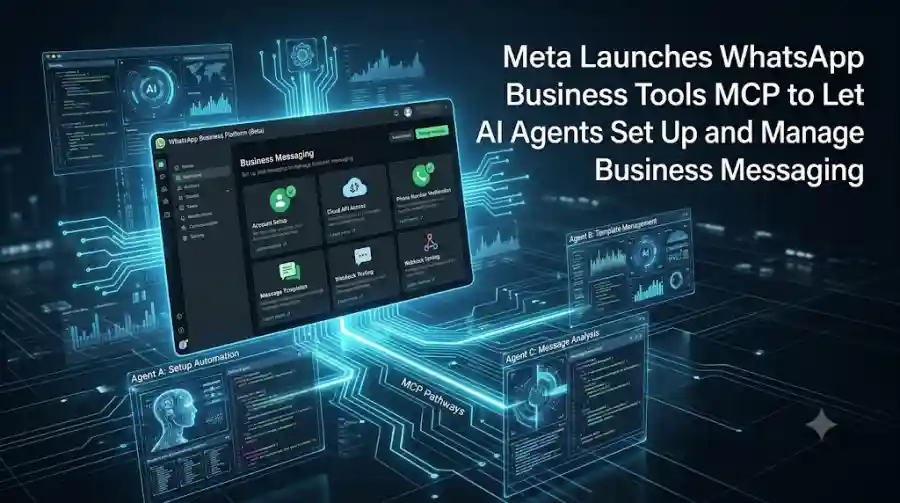
Announced on September 15, 2026, the new Model Context Protocol server connects AI coding agents directly with the WhatsApp Business Platform. Meta says developers can use an AI agent to handle several setup and management tasks through natural-language instructions instead of manually moving between the Developer Console, Business Manager, API documentation and their code editor.
The new tool supports AI agents including Claude, Cursor, Codex and ChatGPT, according to Meta's announcement and reporting on the rollout.
What Is WhatsApp Business Tools MCP?
WhatsApp Business Tools MCP is a Model Context Protocol server created by Meta for the WhatsApp Business Platform.
MCP provides a standardized way for AI applications to interact with external tools and services.
In this case, Meta is giving compatible AI coding agents a dedicated set of tools for working with WhatsApp Business.
Instead of asking an AI assistant only to explain how WhatsApp Business should be configured, developers can use the connected agent to perform supported operations within the platform.
Meta's developer announcement describes the system as a way to set up and manage WhatsApp Business from an AI agent.
That changes the role of an AI coding assistant from providing instructions to interacting directly with parts of the business-messaging infrastructure.
AI Agents Can Help Create a WhatsApp Business Account
One of the main use cases is initial account setup.
Meta says the WhatsApp Business Tools MCP can help an AI agent create a WhatsApp Business Account and work through the setup process.
The agent can also add and verify a business phone number and register it for use with the WhatsApp Cloud API.
This matters because the initial WhatsApp Business integration can involve multiple configuration steps before developers can begin testing messages.
With the MCP approach, a developer can describe the desired configuration in a conversation and let the connected AI agent perform supported setup operations.
The agent can also check for configuration issues that could prevent the business from moving forward.
Phone Verification and Cloud API Setup
Phone-number configuration is another important part of the new workflow.
According to Meta's announcement as reported by developers covering the launch, the MCP can add and verify a phone number and register it with the WhatsApp Cloud API.
The AI agent can therefore help bridge the gap between the business account and the technical API infrastructure needed for messaging integrations.
For developers building customer-support systems, ecommerce workflows or other WhatsApp-based business applications, reducing this initial configuration work could make experimentation easier.
However, authentication and permission controls remain part of the workflow.
Meta says changes that modify account state require an authenticated person rather than allowing an AI agent to make unrestricted changes independently.
AI Agents Can Create and Modify Message Templates
WhatsApp Business messaging relies heavily on structured message templates.
Creating and maintaining those templates can become repetitive when businesses operate multiple customer communication workflows.
The new MCP allows developers to use an AI agent to create and customize WhatsApp message templates.
A developer can describe the type of template required, and the agent can help create it through the connected WhatsApp Business tools.
The system can also report the template's approval status, according to reporting on Meta's announcement.
This gives businesses another way to use natural-language instructions for a previously manual configuration task.
For example, a developer could describe a template for an appointment reminder, order notification or customer follow-up instead of manually navigating through multiple configuration screens.
The resulting template still operates within WhatsApp's existing business-messaging requirements and approval processes.
Webhooks Can Also Be Configured and Tested
WhatsApp Business integrations often depend on webhooks to receive events from the platform.
Developers need to configure callback URLs, subscribe to relevant fields and verify that messages and other events are reaching their application correctly.
Meta's WhatsApp Business Tools MCP can help with these tasks as well.
The connected AI agent can configure and test webhooks and send test messages as part of the development process.
That creates a more complete workflow.
Instead of using AI only to generate webhook code, developers can use the agent to interact with the WhatsApp Business configuration itself.
The difference is important because integration problems can occur at several layers.
An application may have correct code but still have an incorrectly configured webhook or missing platform setting.
AI Agents Can Help Find Setup Problems
Another feature of the new MCP is its ability to identify configuration issues during the WhatsApp Business setup process.
Meta's tools can check areas such as authentication, permissions and required business configuration.
Reporting on the launch says the system can also identify missing items involving payment methods or Business Verification.
This could reduce one of the frustrating parts of API integration: discovering a missing configuration only after an application fails during testing.
An AI agent can instead inspect the available setup information and explain what still needs attention.
The agent does not remove the need for human authorization, but it can make the troubleshooting process more conversational.
Authentication Remains Under Human Control
Giving AI agents access to business infrastructure creates an obvious security question.
If an AI agent can create accounts, modify configurations or send test messages, organizations need to know exactly what the agent is authorized to do.
Meta's implementation includes authentication and permission controls.
According to reporting on the developer announcement, users authenticate through Facebook Login for Business and grant the relevant permissions. Changes to account settings require an authenticated user.
The distinction is important.
The MCP is designed to let AI agents perform supported tasks, but it does not mean that an AI system receives unrestricted control over a company's WhatsApp infrastructure.
This type of permission model is likely to become increasingly important as more enterprise services expose MCP interfaces to AI agents.
Tool Calls Are Logged
Visibility is another important part of the system.
Reporting on Meta's announcement says calls made through the WhatsApp Business Tools MCP are recorded, while reads operate within the user's own access context.
Logging provides an audit trail for activity performed through the connected AI agent.
That can be useful when developers need to determine what an agent changed during setup or troubleshooting.
For businesses adopting agentic development workflows, this type of traceability can become an important operational requirement.
The more systems an AI agent can access, the more important it becomes to know what actions were taken and under whose authorization.
WhatsApp Business MCP Works Alongside Meta's Other MCP Tools
The new WhatsApp-specific server is not Meta's first MCP initiative.
Meta previously introduced Meta Social Technologies MCP, which provides AI agents with broader developer capabilities.
That system can help agents discover Graph API endpoints, search Meta's documentation and troubleshoot development problems.
The new WhatsApp Business Tools MCP is more specialized.
Meta's developer ecosystem positions the two tools as complementary: one provides broader developer assistance, while the WhatsApp-specific server exposes functionality directly related to WhatsApp Business setup and management.
For developers building a complete WhatsApp integration, using both can therefore provide a broader workflow.
One can help with understanding and troubleshooting Meta's APIs, while the other handles supported WhatsApp Business operations.
Which AI Agents Can Use It?
The new MCP is designed to work with compatible AI coding agents.
Current reporting identifies:
- Claude
- Cursor
- Codex
- ChatGPT
as supported AI-agent options for connecting to the WhatsApp Business Tools MCP.
This is significant because Meta is not requiring developers to use a single proprietary AI assistant.
Instead, the MCP approach allows different AI applications to interact with the same underlying business platform.
That is one of the broader reasons MCP has become relevant to AI-tool developers.
A service can expose capabilities through a standardized interface while users choose which compatible AI application they want to operate through.
This Is Primarily a Development and Testing Tool
The new MCP should not be confused with a replacement for WhatsApp's production messaging infrastructure.
Meta's rollout is focused on helping developers set up and test WhatsApp Business integrations.
Reporting on the launch says the tool is not intended to be a production messaging-at-scale solution.
This distinction is important.
The MCP helps configure and test the underlying WhatsApp Business environment, but businesses still need their normal production architecture, application logic, authentication, monitoring and messaging infrastructure for large-scale customer communication.
The AI agent is therefore acting more like an intelligent development and administration layer.
Rollout Is Gradual
The WhatsApp Business Tools MCP is being rolled out gradually.
That means availability may differ between developers, accounts and supported AI platforms during the initial release.
Developers interested in trying the system should therefore check the latest Meta documentation and the supported AI platform's MCP configuration requirements rather than assuming that every account has immediate access.
Because the product is new, Meta may also change individual tools and capabilities during the rollout.
Why Meta Is Bringing AI Agents Into Business Messaging
The launch fits into a broader change in how developers interact with cloud platforms.
Traditionally, developers work through dashboards, documentation, command-line tools and APIs.
AI agents introduce another interface: natural-language instructions combined with the ability to execute actions.
Instead of manually searching documentation for the correct API endpoint, a developer can ask an agent to perform a supported task.
The agent can determine which tool to call and return the result in the same conversational workflow.
Meta's WhatsApp Business MCP demonstrates how this model can extend beyond coding into infrastructure configuration and business operations.
What This Means for AI Tool Developers
For AI developers, the launch provides another example of MCP moving toward real operational use.
The important part is not simply that an AI can read WhatsApp documentation.
The agent can interact with supported WhatsApp Business functions.
That means MCP becomes a bridge between an AI model and an external business system.
The same pattern could apply to other services:
- A platform exposes tools through MCP.
- An AI agent discovers those tools.
- A user describes the desired task.
- The agent determines which operations are required.
- Authentication and permissions control access.
- The platform performs the authorized actions.
- The result is returned to the user.
WhatsApp Business is now another major platform experimenting with this workflow.
The Security Challenge Grows With Agent Access
The new capability also highlights why AI-agent security is becoming a major part of enterprise AI infrastructure.
An AI agent connected only to a document system has one set of risks.
An agent connected to business accounts, messaging infrastructure, APIs and customer data has a much larger operational surface.
That makes authentication, authorization, logging and least-privilege access important.
The WhatsApp Business MCP's requirement for authenticated users when changing state and its logging approach are examples of controls that can become increasingly important as agents gain access to more external systems.
Businesses should therefore treat MCP connections as infrastructure integrations rather than simply installing another AI plugin.
How WhatsApp Business Tools MCP Could Change Developer Workflows
The immediate benefit is reducing the amount of repetitive configuration developers need to perform manually.
A developer can describe what they want in natural language and allow the AI agent to handle supported operations.
That could make several tasks faster to iterate on:
- Creating a new WhatsApp Business setup
- Adding and verifying a phone number
- Registering Cloud API access
- Creating message templates
- Checking template status
- Configuring webhooks
- Sending test messages
- Finding setup problems
- Troubleshooting configuration
The biggest change is therefore not a single new WhatsApp feature.
It is the shift from dashboard-driven configuration toward agent-assisted infrastructure management.
Final Thoughts
Meta's WhatsApp Business Tools MCP gives AI coding agents a direct interface for working with important parts of WhatsApp Business setup and testing.
The new system can help with account creation, phone-number verification, Cloud API registration, message templates, webhooks and test messages, while authentication and permission controls remain part of the workflow.
The launch is also notable because it connects several major AI coding environments — including Claude, Cursor, Codex and ChatGPT — to the same business platform.
For developers, that means WhatsApp Business configuration can increasingly become a conversational task rather than a sequence of disconnected dashboard operations.
For the broader AI industry, Meta's move shows how MCP is evolving from a way to expose information and tools into a mechanism through which AI agents can interact with real business infrastructure.
The rollout is still early and focused on development and testing, but the underlying direction is clear: AI agents are becoming interfaces for the software and services developers already use.
Frequently Asked Questions
What is WhatsApp Business Tools MCP?
WhatsApp Business Tools MCP is Meta's Model Context Protocol server that connects compatible AI agents to the WhatsApp Business Platform for supported setup, configuration and testing tasks.
Which AI agents support WhatsApp Business Tools MCP?
Meta's new system is currently reported as working with AI coding agents including Claude, Cursor, Codex and ChatGPT.