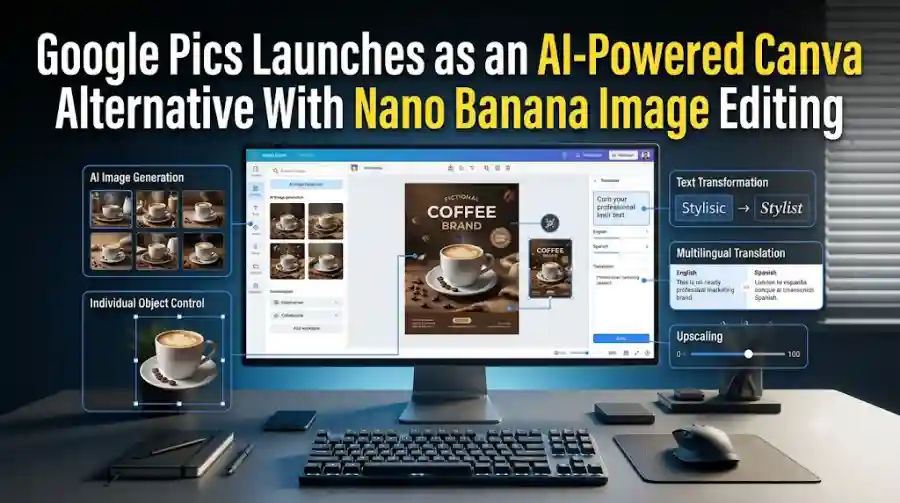
Google Pics Brings AI Image Creation, Object Editing, Text Translation and 4K Upscaling to Workspace
Google is trying to reduce that workflow with Google Pics, a new AI-powered image creation and editing application built directly around Google Workspace.
Google says Pics became generally available starting September 1, 2026, bringing AI image generation and precise object-based editing into Workspace workflows.
The tool is powered by Google's AI imaging technology, including its Nano Banana image generation and editing model.
Instead of treating AI image generation as simply “type a prompt and receive a picture,” Google Pics focuses on more controlled editing.
Users can generate images, select individual objects, modify specific areas, edit text inside images, translate text, crop designs for different formats and upscale images to 2K or 4K.
That makes Google Pics particularly interesting for marketers, students, businesses, content creators and anyone who regularly creates visual material.
What Is Google Pics?
Google Pics is an AI image generation and editing tool from Google designed for Workspace users.
It combines two workflows:
- Generate new visuals with AI
- Precisely edit existing visuals with AI
Users can start with a text prompt or import an existing image from their computer, Google Drive or Google Photos.
The important difference is that Pics is designed around targeted editing.
Rather than regenerating an entire image whenever something needs to change, users can select a particular object or area and ask the AI to modify it.
Google calls this a more precise approach to AI image editing.
This could make the tool useful for business designs where maintaining the rest of an image is important.
Google Pics Uses Nano Banana
Google Pics is powered by Google's latest image-generation and editing technology.
Google's documentation identifies Pics as an image creation and editing tool powered by Gemini and Nano Banana.
Nano Banana has become one of Google's key image-generation technologies.
Inside Pics, it provides the underlying AI capabilities while Google adds a design-focused interface and Workspace integration.
That combination is important.
A powerful image model is useful, but businesses often need more than image generation.
They need to make changes, preserve specific elements, collaborate with colleagues and place the final visual into documents or presentations.
Pics is designed around that complete workflow.
Generate Images From Simple Prompts
The starting point is still natural-language prompting.
Users can describe what they want and generate an image.
For example, a marketing employee could ask for a professional product-promotion graphic.
A teacher could create a visual for a classroom presentation.
A small business could generate a promotional poster.
A social-media manager could create several variations of a campaign image.
Google says Pics generates multiple options from a single prompt, allowing users to choose a preferred version rather than relying on a single generation.
This can reduce the number of times users need to completely restart the creation process.
Object-Level AI Editing Is the Key Feature
One of Google Pics' most useful features is object-based editing.
Users can select an individual element in an image and modify it without necessarily changing everything around it.
For example, imagine a product image containing a chair, table and background.
Instead of asking an AI model to regenerate the entire image, a user could select the chair and request a different color or style.
The surrounding environment can remain largely unchanged.
Google says Pics allows users to isolate objects and transform them using targeted instructions.
This is particularly useful for commercial design.
Businesses often need to maintain branding and product consistency while changing individual visual elements.
Edit Text Inside Images
AI-generated images have historically struggled with accurate text.
Even when an image looks visually impressive, the words inside it may contain spelling mistakes or awkward typography.
Google Pics adds direct text editing capabilities.
Google says users can modify, reformat and translate individual text elements inside an image.
This could be particularly useful for international marketing.
A company could create a poster and then adapt the text for different languages without rebuilding the entire design.
The feature also makes AI-generated posters and announcements more practical.
Users can correct wording rather than regenerating the entire image.
Translate Text Without Rebuilding the Design
The translation feature is another important part of Google's approach.
Instead of extracting the text, translating it externally and manually rebuilding the graphic, users can translate text elements directly within the image.
Google says Pics can translate text while maintaining the design and font characteristics.
That could help companies produce localized versions of:
- Marketing posters
- Product announcements
- Event invitations
- Social-media graphics
- Educational materials
- Internal communications
For global teams, this could save time during content localization.
Google Pics Can Upscale Images to 2K and 4K
Google Pics also includes image upscaling.
According to Google's Workspace announcement, users can upscale images to 2K or 4K.
This matters when an image needs to move from a digital workflow into a higher-resolution presentation or marketing asset.
AI-generated graphics may initially be suitable for online use but require higher resolution for certain applications.
Having upscaling inside the same workflow means users do not necessarily need to move the file to another enhancement service.
The tool also includes cropping options for web, social-media, print and digital formats.
Google Pics Works With Google Docs and Slides
Google is not positioning Pics as a completely separate image editor.
The company is integrating it into Workspace.
Google says the initial integrations include Docs and Slides, while Drive integration is also being expanded.
This means users can edit visuals without constantly downloading and uploading files between different applications.
For example, someone working on a Google Slides presentation can select an image and use Pics' editing capabilities.
A document creator can similarly work with images without leaving the broader Workspace environment.
That integration could be one of Pics' biggest advantages over standalone AI image generators.
Collaboration Is Built Into the Workflow
Google Workspace is built around collaboration, and Pics follows the same approach.
Google says users can share Pics creations with other people and collaborate on the same image.
This makes the tool more relevant to teams than a basic AI image generator.
A marketing team could create a campaign visual and allow colleagues to review or modify it.
A teacher could create a classroom graphic and share it with other educators.
A business could keep visual work within its existing Workspace environment.
The objective is to make AI image creation part of normal collaborative work rather than an isolated creative experiment.
Google Pics Is Competing With Canva and Adobe Express
Google Pics enters a market already dominated by design platforms.
Tools such as Canva and Adobe Express have spent years building workflows around templates, layouts, collaboration and brand assets.
Google is taking a more AI-first approach.
Instead of starting with a blank canvas and manually arranging elements, users can describe what they want and let AI create the initial design.
They can then refine individual elements.
This could appeal to users who know what they want visually but do not have professional graphic-design skills.
Google's advantage is its existing Workspace ecosystem.
Millions of users already create documents, presentations and business content through Google products.
If image creation is integrated directly into those workflows, users may have less reason to open a separate design application.
Who Can Use Google Pics?
Google Pics is not limited to one type of user.
Google lists availability across several Workspace and Google AI plans.
Eligible business plans include:
- Business Standard
- Business Plus
- Enterprise Standard
- Enterprise Plus
Google also lists access for Google AI Pro, Google AI Ultra and Google AI Pro for Education, along with certain other eligible plans.
Availability can vary by account type and rollout status.
Google's support documentation also says Pics is currently available on desktop.
Users should therefore check their specific account before assuming the feature is available.
Google Pics Is Currently Rolling Out
Although Google announced general availability beginning September 1, access is being rolled out gradually.
For rapid-release Workspace domains, Google says the rollout can take up to 15 days.
For scheduled-release domains, the rollout starts September 15, 2026 and can also take several days.
This means two eligible Workspace users may not see Pics at exactly the same time.
Google also notes that generative AI usage is subject to limits.
The company says higher access is planned through February 28, 2027, after which limits could change.
Users who cannot immediately find Pics should therefore check their account eligibility and rollout status rather than assuming the product has been discontinued.
Google Pics Could Change How Businesses Create Visual Content
The biggest potential impact of Google Pics is not another AI image generator.
The more interesting change is the integration of image generation directly into everyday business software.
Consider a simple workflow.
A marketing employee is preparing a product presentation.
Previously, they might need to:
- Open an AI image generator.
- Generate an image.
- Download it.
- Open an image editor.
- Make changes.
- Upload it to Drive.
- Insert it into Slides.
- Repeat the process after feedback.
With Pics, much of this can happen inside Google's ecosystem.
Generate.
Edit.
Refine.
Collaborate.
Insert.
That reduction in workflow friction could be more important for businesses than the raw quality of the underlying image model.
Google Pics Could Be Useful for Social Media Content
Social-media teams constantly need new visuals.
They may need:
- Instagram graphics
- Product announcements
- Event posters
- Promotional banners
- Campaign variations
- Quote cards
- Digital advertisements
Google Pics can generate multiple variations from a prompt and provide targeted editing tools.
That makes it possible to create several versions of the same concept without rebuilding each design manually.
The ability to crop for different formats also helps adapt content for different publishing channels.
It Could Also Help Small Businesses
Professional design software can be intimidating for small businesses.
A business owner may know what they want a poster to communicate without knowing how to build the design manually.
AI changes that equation.
Instead of learning every design tool, the user can describe the desired result.
For example:
“Create a clean promotional poster for a weekend sale with a premium retail style, space for a product image and large headline text.”
The AI can create an initial concept.
The user can then edit individual elements.
This does not eliminate the need for design judgment, but it can reduce the technical barrier.
Google Pics and AI Image Editing Are Moving in a New Direction
The AI image market is gradually moving beyond simple text-to-image generation.
The first generation of tools focused heavily on producing impressive images.
The next generation is increasingly focused on control.
Users want to change one object.
They want to preserve another.
They want to edit text.
They want to change the format.
They want to translate the design.
They want to upscale the result.
They want version history.
Google Pics brings many of these functions together.
That makes it more like an AI-native design environment than a simple image generator.
Google Pics Could Become a Major Workspace AI Feature
Google already has a huge distribution advantage through Workspace.
Docs, Slides and Drive are used daily by businesses, schools and individuals.
Adding AI image creation to those products means users can encounter generative design without searching for a separate AI platform.
This could help Google compete with established creative software companies.
The challenge will be execution.
Users will judge Pics not only by how impressive the generated images look but also by how accurately it preserves objects, handles text, follows editing instructions and fits into real production workflows.
The more reliable those features become, the more useful Pics will be for professional work.
Google Pics is one of Google's more practical AI product launches because it connects image generation with everyday productivity.
The tool combines AI image creation with precise editing, object selection, text modification, translation, cropping, upscaling and collaboration. It is also integrated with Google Workspace, starting with Docs and Slides and expanding to Drive.
Its use of Nano Banana gives Google a strong image-generation foundation, but the real differentiator is the workflow.
Users can create an image, select individual elements, make changes and continue working inside the Google ecosystem.
For businesses, creators, educators and marketers, that could be more useful than simply generating another impressive AI image.
Google Pics represents a broader shift in generative AI: from creating content once to continuously creating, editing and refining content inside the applications people already use.
FAQs
What is Google Pics?
Google Pics is Google's AI-powered image creation and editing tool for Google Workspace. It uses Gemini and Nano Banana technology to generate images and make precise edits to existing visuals.
What can Google Pics do?
Google Pics can generate images from prompts, create multiple variations, isolate and edit objects, modify or translate text, crop images for different formats, upscale images to 2K or 4K and support collaborative editing.