Gemini Omni 1.1 Flash Gives AI Video Developers More Control Over Scenes, Camera Moves and 4K Output
Google says the model is available through the Gemini API in Google AI Studio and the Gemini Enterprise Agent Platform. It is also available to Google AI Plus, Pro and Ultra subscribers through Google Flow, while scene extension is available in the Gemini app.
The update is important because AI video generation is moving from one-shot creation toward directable video production.
What Is Gemini Omni 1.1 Flash?
Gemini Omni 1.1 Flash is Google's latest production-oriented version of its Omni video-generation technology.
The company describes the model as a tool for developers building generative video workflows, creative applications and media-editing software.
The main goal is greater control.
Google's previous AI video workflows could generate impressive individual clips, but creating a longer sequence often required generating separate shots and trying to maintain consistency manually.
Omni 1.1 Flash attempts to solve part of that problem by allowing the model to use more previous video context when continuing a scene.
This makes it particularly interesting for filmmakers, creative software developers, advertising platforms and AI video applications.
Gemini Omni 1.1 Flash Can Extend Scenes Up to 40 Seconds
One of the biggest improvements is scene extension.
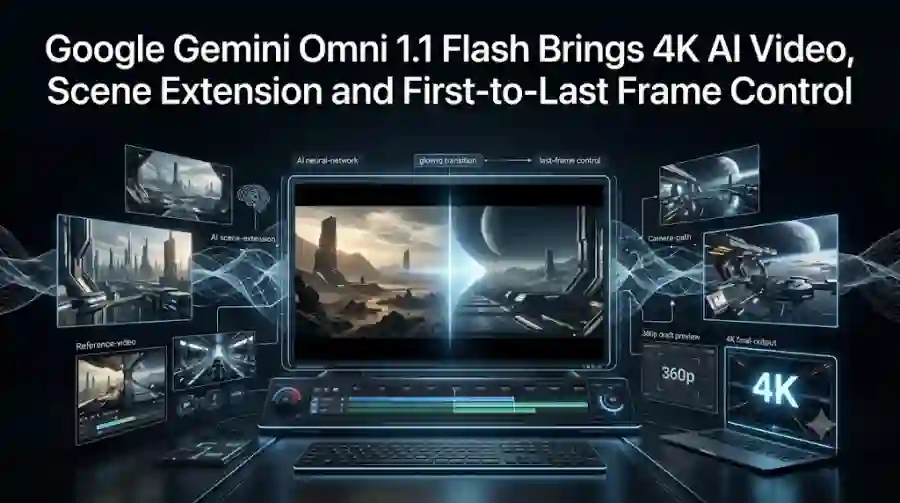
Google says Omni 1.1 Flash can analyze up to 10 seconds of previous video context when extending a scene.
The model can then continue the footage while attempting to maintain visual consistency and narrative continuity.
Scene extensions can be generated in 10-second increments, reaching a cumulative length of up to 40 seconds.
This is useful for creators who have already generated a short clip but want the story or camera movement to continue.
For example, a developer could start with a character walking through a hallway and then ask the model to continue the scene as the camera moves deeper into the building.
Instead of generating a completely separate clip, the model can use the existing footage as context.
That can make longer AI-generated sequences easier to construct.
Why Longer Context Matters for AI Video
Video consistency has always been one of the major challenges of generative video.
A model may produce an excellent five-second clip but struggle when asked to continue it.
Characters can change appearance.
Objects can move unexpectedly.
Camera positions can jump.
Lighting can change.
The environment may no longer match the previous shot.
By analyzing more previous context, Omni 1.1 Flash is designed to reduce some of these problems.
Google says the 10-second context window is intended to improve visual consistency and narrative adherence during scene extension.
It does not mean every generated sequence will be perfect.
However, having more visual context gives the model more information about what should remain consistent.
First and Last Frame Control Gives Creators More Precision
Another major feature is first-and-last-frame generation.
Instead of describing an entire camera transition only through text, developers can provide a starting frame and an ending frame.
Gemini Omni 1.1 Flash then generates the video connecting those two points.
This can be useful for complex camera movements.
Google demonstrates use cases involving:
- Camera orbits
- Zoom transitions
- Whip pans
- Seamless loops
- Continuous shots
- Character transitions
The feature essentially gives creators two visual anchors.
The AI is responsible for generating what happens between them.
This is particularly valuable when a specific beginning and ending composition is required.
For example, a creator could specify the first frame showing a person standing inside a room and a final frame showing the camera behind that person.
The model can then attempt to generate the transition between those two compositions.
360p Drafts Can Make Experimentation Cheaper
High-resolution AI video generation can be expensive and slow when creators are experimenting.
Google is addressing this with a new 360p draft mode.
According to Google, 360p previews can generate up to 60% faster and cost about one-third as much as standard 720p generation.
This is designed for rapid prototyping.
Instead of spending resources generating a high-resolution video every time, creators can first test:
- Camera movements
- Story ideas
- Scene transitions
- Character positioning
- Composition
- Prompt variations
Once the concept works, the final version can be generated at a higher resolution.
That workflow could make AI video production more efficient.
Gemini Omni 1.1 Flash Supports 4K Output
For final production, Omni 1.1 Flash can generate high-resolution output at 1080p or 4K.
Google specifically highlights 4K output as one of the major improvements in the new model.
This matters because AI-generated video has increasingly moved beyond social-media experiments.
Creators are now using AI video for:
- Advertising
- Product demonstrations
- Educational content
- Short films
- Marketing campaigns
- Concept visualization
- Creative development
- Video editing
Higher resolution makes generated material more suitable for professional workflows.
However, 4K output does not automatically make every AI-generated clip production-ready.
Creators still need to evaluate motion quality, consistency, composition and factual accuracy.
Developers Can Use Video References
Omni 1.1 Flash also supports video references.
Google says developers can provide up to three seconds of video reference material when generating a scene.
This can help maintain visual context and character consistency.
That expands the model beyond purely text-driven generation.
A developer could provide reference material and then describe how the AI-generated scene should use or transform that reference.
This opens the door to more advanced applications where text, images and video work together.
Google Is Targeting AI Video Developers
Gemini Omni 1.1 Flash is not positioned only as a consumer video generator.
Google specifically launched the model for developers.
It is available through:
- Gemini API
- Google AI Studio
- Gemini Enterprise Agent Platform
- Google Flow
- Gemini app for supported scene-extension functionality
Google also provides documentation, a cookbook and prompting guides for developers.
This makes the release particularly relevant to companies building their own AI video products.
Instead of creating a complete video-generation model themselves, developers can integrate Google's capabilities into their applications.
Adobe and Other Companies Are Already Using Omni
Google says Gemini Omni Flash is already being used in production by several companies.
Adobe has integrated Gemini Omni Flash into Adobe Firefly for video-editing workflows.
Google also highlights integrations and use cases involving Figma Weave, GMI Cloud and Runway.
This is important because Google's strategy is not limited to making another standalone AI video generator.
The company wants Omni to become infrastructure that other creative applications can build around.
That could give the model a wider reach than a consumer-only product.
Gemini Omni 1.1 Flash Could Change AI Video Workflows
The biggest change is not necessarily one individual feature.
It is the combination of several controls.
A typical workflow could look like this:
Step 1: Generate a rough scene.
Step 2: Use 360p output to test the idea quickly.
Step 3: Provide a first and last frame to control the transition.
Step 4: Extend the scene using previous video context.
Step 5: Use reference video where character or visual consistency matters.
Step 6: Generate the final version at 1080p or 4K.
This is closer to a traditional production workflow than simply typing a prompt and accepting whatever video the AI creates.
Gemini Omni 1.1 Flash vs Basic Text-to-Video Generation
Traditional text-to-video systems often work like this:
Prompt → Video
The creator describes what they want and receives a generated clip.
Omni 1.1 Flash expands that model:
Prompt + Previous Video + Start Frame + End Frame + References → Controlled Video
This gives creators more ways to influence the result.
The additional controls may become increasingly important as AI-generated video becomes longer and more complex.
Generating a single impressive clip is no longer enough.
Creators need consistency between scenes.
They need predictable camera movement.
They need repeatable characters.
They need efficient iteration.
They need outputs that can fit into an existing editing workflow.
Gemini Omni 1.1 Flash is clearly designed around those requirements.
What Does Gemini Omni 1.1 Flash Cost?
Google's announcement includes a pricing table for Gemini Omni 1.1 Flash and provides access through its developer ecosystem.
The exact cost can depend on the resolution and usage configuration, so developers should check the current official Google AI Studio/API pricing before building production workflows.
The 360p draft mode is particularly important for controlling development costs because Google says it costs approximately one-third as much as standard 720p generation.
For developers testing hundreds of creative variations, that difference could become significant.
Is Gemini Omni 1.1 Flash Available to Regular Users?
Yes, but availability depends on the product.
Google says Omni 1.1 Flash is available to Google AI Plus, Pro and Ultra subscribers globally through Google Flow.
Scene extension is also available to those subscribers through the Gemini app.
Developers can use the model through Google AI Studio and the Gemini API.
This gives Google two distribution paths:
Consumer access through Gemini and Flow
and
Developer access through APIs and AI Studio.
That combination could accelerate adoption.
Why AI Video Is Moving Toward Control
The AI video industry has already demonstrated that models can create visually impressive clips.
The next challenge is making those systems predictable enough for real production.
A filmmaker does not only need a beautiful five-second shot.
They may need the same character to remain consistent across multiple shots.
An advertiser may need a product to remain visually accurate.
A game developer may need a camera to move through a specific environment.
An AI video application may need users to edit and regenerate individual portions of a scene.
These use cases require control.
Features such as frame interpolation, scene extension, video references and resolution-aware workflows are therefore becoming increasingly important.
What Gemini Omni 1.1 Flash Means for AI Video Competition
Google is entering a market that already includes major AI video companies and platforms.
The competition is increasingly focused on more than raw visual quality.
Companies are competing on:
- Generation quality
- Character consistency
- Camera control
- Editing
- Reference inputs
- Video extension
- Resolution
- Speed
- API availability
- Pricing
- Production integrations
Gemini Omni 1.1 Flash directly addresses several of those categories.
Its integration into Google AI Studio, Flow and enterprise developer infrastructure also gives Google a broad distribution advantage.
The Biggest Limitation
Despite the improvements, developers should not assume that Omni 1.1 Flash completely solves AI video consistency.
Generative video remains probabilistic.
Complex scenes can still produce unwanted movements or inconsistencies.
Longer sequences can also amplify small visual errors.
The 40-second cumulative extension limit is another practical constraint.
Creators working on longer productions may still need traditional video-editing software and multiple generation steps.
The model should therefore be viewed as a more controllable AI production component rather than a complete replacement for a professional video-production pipeline.
Gemini Omni 1.1 Flash is one of Google's most practical recent AI video updates because it focuses heavily on control rather than simply claiming better generation quality.
The model can extend scenes using up to 10 seconds of previous context, generate transitions between specified first and last frames, create faster and cheaper 360p drafts, accept short video references and produce outputs up to 4K.
For developers, the model is available through Google AI Studio and the Gemini API ecosystem.
For creators, Google is also making Omni 1.1 Flash available through Flow, while scene extension is available in the Gemini app for eligible subscribers.
The larger trend is clear.
AI video is moving away from:
"Generate me a video."
and toward:
"Help me direct the video exactly the way I want."
That shift could be more important for professional AI video adoption than simply increasing visual quality.
FAQs
What is Gemini Omni 1.1 Flash?
Gemini Omni 1.1 Flash is Google's production-ready AI video model update designed to give developers greater control over generative video workflows.
Can Gemini Omni 1.1 Flash generate 4K video?
Yes. Google says Omni 1.1 Flash can produce final video outputs at 1080p or 4K resolution.