ChatGPT Images 2.5 Brings Sharper AI Images, Sketch-to-Image, Better Editing and New API Models
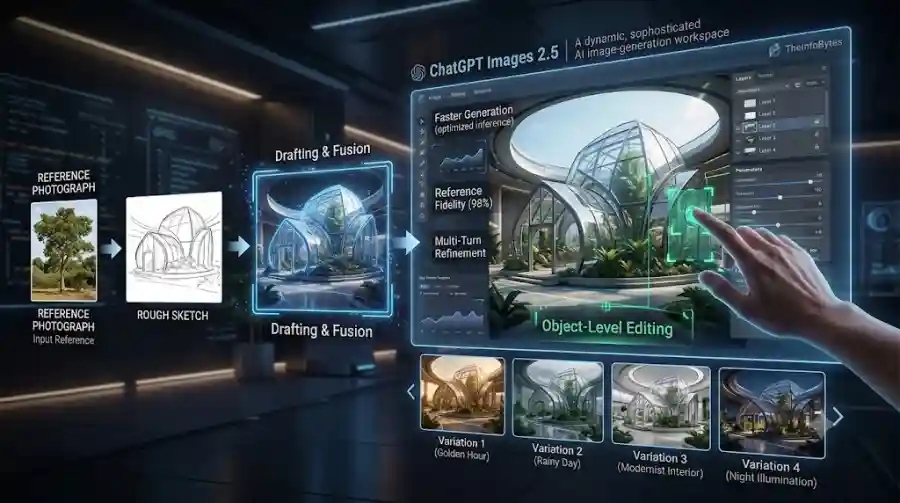
The update focuses on several areas that matter in real creative workflows: sharper image details, more accurate editing, better consistency across multiple edits and faster generation.
OpenAI says Images 2.5 can reduce image-generation latency by up to 50% compared with Images 2.0. The company also says the model is better at preserving subjects from reference images, following complex editing instructions and maintaining details through multiple editing rounds.
But the model upgrade is only part of the story.
OpenAI is also adding new ways to interact with images inside ChatGPT, including Sketch, templates, image comments and prompt sharing.
For developers, OpenAI is introducing two API models: GPT-Image-2.5 Flare and GPT-Image-2.5 Sunburst.
That makes Images 2.5 both a consumer-facing ChatGPT feature and a platform for developers building image-generation products.
What Is ChatGPT Images 2.5?
ChatGPT Images 2.5 is OpenAI's latest image-generation and editing model.
The company describes it as a state-of-the-art image model designed to improve image fidelity, editing precision, generation speed and creative control.
OpenAI says the system is better at:
- Producing natural lighting
- Creating richer textures
- Preserving subjects from reference images
- Following detailed editing instructions
- Maintaining consistency through multiple edits
- Handling complex visual layouts
- Generating images with real-world information
- Creating transparent-background assets
These improvements are important because image generation is increasingly being used for practical work rather than only experimentation.
A user might generate a product image, edit it several times, change the background, modify an object and then adjust the composition.
If every edit changes unrelated parts of the image, the workflow quickly becomes frustrating.
Images 2.5 is designed to reduce that problem.
Image Generation Is Up to 50% Faster
One of the biggest technical improvements is speed.
OpenAI says ChatGPT Images 2.5 has up to 50% lower image-generation latency compared with Images 2.0.
This matters because image creation is often iterative.
A typical workflow might look like:
- Create an initial image.
- Change the background.
- Adjust the subject.
- Fix the lighting.
- Modify the composition.
- Correct text.
- Generate another variation.
If each generation takes a long time, even small changes can become inconvenient.
Faster generation makes experimentation easier.
Users can try more ideas, compare variations and refine their designs without waiting as long between steps.
For professional users, this could have an even larger effect because image creation often involves dozens of revisions.
Better Image Fidelity and Reference Preservation
OpenAI says Images 2.5 has improved fidelity when working with reference photos.
That means the system is designed to preserve recognizable characteristics when transforming an existing subject into a new environment or style.
This is useful for workflows involving:
- Product photography
- Character concepts
- Portrait variations
- Marketing visuals
- Social-media content
- Brand assets
- Creative mockups
For example, a user could provide a reference photograph and ask the system to place the subject in another environment.
The challenge for an image model is not simply generating a visually attractive image.
It must preserve the important characteristics of the original subject.
OpenAI says Images 2.5 improves this behavior, making reference-led workflows more reliable.
More Precise AI Image Editing
Generation is only one side of AI image creation.
Editing is becoming equally important.
OpenAI says Images 2.5 is better at changing only the part of an image that the user asks to modify while preserving the rest.
This could be especially useful when working with complex scenes.
Imagine an image containing:
- A person
- A vehicle
- Buildings
- Text
- Multiple objects
- A detailed background
A user might want to change only the vehicle.
With weaker editing behavior, the AI may accidentally modify the person, lighting or background.
Images 2.5 is designed to make more targeted edits while keeping unrelated elements stable.
That makes the model more useful for practical editing instead of simple image regeneration.
Multi-Turn Editing Gets More Consistent
Another major improvement is consistency across multiple editing rounds.
AI image editing often becomes difficult when a user makes several changes in the same conversation.
For example:
Create image → change clothes → change background → change lighting → add object
With some image-generation systems, each new edit can gradually change details that the user wanted to preserve.
OpenAI says Images 2.5 is better at maintaining earlier changes through longer editing conversations.
This means a new edit is more likely to build on the previous version rather than effectively starting over.
That could make ChatGPT more useful as an actual creative workspace.
ChatGPT Gets a New Sketch-to-Image Workflow
One of the most interesting additions is Sketch.
Sometimes describing an image with words is harder than drawing a rough idea.
OpenAI is addressing that problem by allowing users to create a sketch directly in ChatGPT and use it as a reference for image generation.
On mobile, users can type @ in the message box and select Sketch. They can then draw their concept and describe what they want the final image to look like.
The sketch does not have to be professionally drawn.
It can simply communicate:
- Object placement
- Composition
- Direction
- Shape
- Layout
- Relative size
This creates a bridge between traditional visual thinking and generative AI.
Why Sketch Could Be Useful
Text prompts are powerful, but they are not always the best way to describe visual relationships.
Consider a simple example.
A user wants:
A car on the left, a person in the center and a building in the background.
Writing those instructions can work.
But a quick drawing can communicate the arrangement immediately.
Sketch could therefore be particularly useful for:
- Graphic designers
- Product designers
- Architects
- Content creators
- Students
- Marketers
- Illustrators
- Social-media creators
The user can provide the rough structure and let AI handle the detailed rendering.
That changes the interaction from:
Describe everything → generate
to:
Draw the idea → describe the style → generate
Templates Make Image Creation Easier
OpenAI is also introducing templates inside ChatGPT Images.
Users can choose a template for common creative formats and then customize it with their own requirements.
Examples include formats such as:
- Posters
- Merchandise
- Promotional graphics
- Social content
- Product visuals
The goal is to reduce the blank-page problem.
Not every user knows how to construct an effective image prompt from scratch.
Templates can provide a starting structure.
The user can then add details such as:
- Text
- Subject
- Brand style
- Colors
- Layout
- Design direction
OpenAI says ChatGPT may also ask follow-up questions to help refine the request.
Users Can Now Comment Directly on Images
Another practical feature is image commenting.
Instead of writing a completely new prompt to explain what needs to change, users can add comments directly to an image.
This creates a more visual editing workflow.
For example, a user could identify a specific area and say:
Make this product larger.
Or:
Remove this object.
Or:
Change the background here.
The idea is simple, but it could make iterative editing much easier.
OpenAI says users can open a generated image full-screen on mobile and edit it or add comments describing the desired changes.
ChatGPT Images 2.5 Can Share Prompts
OpenAI is also making it easier to share the prompt used to create an image.
When users share an image, they can choose to include the prompt that generated it.
This creates an interesting social and educational workflow.
Instead of simply showing an image, users can share the instructions behind it.
Another person can then use the idea with their own photos, subjects or creative details.
For AI creators, prompt sharing could make it easier to exchange techniques.
It also gives users a way to turn successful generations into reusable creative starting points.
Better Complex Layouts and Real-World Information
OpenAI says Images 2.5 has improved its ability to understand complex visual instructions.
The company also highlights better accuracy for images containing real-world information and support for more complex layouts, including transparent backgrounds.
This matters for commercial image generation.
AI images are increasingly used for:
- Posters
- Infographics
- Product designs
- Advertisements
- Presentation graphics
- Social-media campaigns
- Marketing assets
These formats require more than attractive visuals.
They often require structure.
Text needs to be positioned correctly.
Objects need to stay aligned.
The composition needs to communicate information clearly.
Improving those areas could make AI-generated images more practical for business use.
OpenAI Introduces Two New API Image Models
ChatGPT Images 2.5 is not limited to ChatGPT.
OpenAI is also introducing two new image models through its API:
GPT-Image-2.5 Flare
GPT-Image-2.5 Sunburst
The two models are designed for different production needs.
GPT-Image-2.5 Flare
Flare brings the Images 2.5 improvements into the API.
OpenAI describes it as the default choice for most applications.
It is designed for:
- Creator applications
- Social-media content
- Product experiences
- Visual search
- Image prototyping
- High-volume image generation
OpenAI says Flare delivers higher-quality images than GPT-Image-2 while providing 50% lower latency.
That combination could make it attractive for applications that need to generate many images quickly.
GPT-Image-2.5 Sunburst
Sunburst is aimed at more demanding visual workflows.
OpenAI says it provides an additional level of precision for detailed creative work while accepting longer generation times.
That makes the two models easier to think about as different optimization choices.
Flare: prioritize speed and general production use.
Sunburst: prioritize precision for more detailed creative work.
Developers can therefore choose the model according to their application instead of using the same configuration for every workload.
ChatGPT Images 2.5 Is Available Across Platforms
OpenAI says Images 2.5 is rolling out to ChatGPT, ChatGPT Work and Codex users across:
- Desktop
- Mobile
- Web
The company says the rollout is available across all tiers.
OpenAI's Help Center also confirms that ChatGPT Images is available on all tiers, while Images with thinking is available on Plus, Pro and Business, with Enterprise and Edu access planned later.
Availability of individual capabilities can still vary depending on the rollout and product environment.
Safety and Image Provenance
As image generation becomes more powerful, provenance and safety become increasingly important.
OpenAI says ChatGPT Images 2.5 continues to use safeguards around image generation.
The company also says it uses C2PA metadata and invisible watermarking to help identify images generated by its tools.
OpenAI has also published a dedicated system card for Images 2.5 covering safety challenges, evaluations, mitigations and image provenance.
This is important because better image generation also increases the need to understand where synthetic media comes from.
How ChatGPT Images 2.5 Changes AI Image Creation
The biggest change is not simply that images look better.
The more important development is the shift toward interactive image editing.
Older AI image workflows often looked like:
Prompt → Generate → Download
Newer workflows are becoming:
Prompt → Generate → Edit → Comment → Refine → Re-edit → Share
That difference is significant.
The AI becomes part of the creative process rather than simply being a generator.
Users can keep working with the same image until it reaches the desired result.
ChatGPT Images 2.5 vs Traditional AI Image Generators
Traditional image generators remain useful for quickly creating new concepts.
But professional users often need more control.
They may need to preserve a specific product.
They may need to maintain the same character.
They may need to change one object.
They may need to produce multiple versions of the same design.
They may need to make corrections without rebuilding the entire image.
This is where Images 2.5 is positioned differently.
OpenAI is focusing heavily on editing consistency and precision rather than only on one-shot image quality.
That could make ChatGPT more useful for longer creative workflows.
ChatGPT Images 2.5 Could Be Useful for Businesses
Businesses are among the groups that could benefit from the update.
Marketing teams regularly need visual assets for:
- Social-media campaigns
- Product launches
- Advertisements
- Blog graphics
- Presentations
- Promotional materials
- Website content
The faster generation and improved editing could reduce the time required to produce those assets.
Templates can also help employees who do not have professional design experience.
Instead of starting with a blank prompt, they can begin with a common format and customize it.
Creators Can Get More From Reference Images
Reference-image workflows are becoming increasingly important.
A creator may already have:
- A product photograph
- A portrait
- A logo
- A character concept
- A location
- A design draft
The goal is not necessarily to create something completely new.
It may be to transform the existing asset.
OpenAI says Images 2.5 is better at preserving distinctive subject characteristics when using reference images.
That could make the model especially useful for brand and content workflows where consistency matters.
The Update Also Strengthens OpenAI's Image API
For developers, the API launch may ultimately be more important than the ChatGPT interface.
Companies can now integrate the Images 2.5 capabilities into their own products.
That means users may encounter the technology without directly using ChatGPT.
Potential applications include:
- AI design platforms
- E-commerce tools
- Marketing software
- Social-media applications
- Visual search
- Product customization
- Creative automation
- Advertising platforms
The availability of different API models gives developers more control over the quality-speed trade-off.
What Developers Should Consider
Developers evaluating GPT-Image-2.5 should look beyond image quality.
Important factors include:
- Generation latency
- Image quality
- Editing reliability
- Reference-image consistency
- Cost
- Output resolution
- API integration
- Safety requirements
- Commercial usage requirements
- Volume of generation
A model that produces beautiful images but is too slow or expensive may not be practical for a high-volume application.
Similarly, a fast model may not be appropriate for premium creative workflows that require extremely precise results.
The two new API variants give developers more flexibility.
The Bigger AI Trend
ChatGPT Images 2.5 reflects a broader change across generative AI.
The industry is moving from:
Generation
toward:
Generation + Editing + Control + Collaboration
This is happening across image, video, audio and text tools.
Users increasingly expect AI systems to remember what they created, preserve important details and make targeted changes instead of producing a completely different result every time.
That makes consistency one of the most important capabilities in modern generative AI.
Is ChatGPT Images 2.5 a Major Upgrade?
Yes, particularly for users who regularly edit AI-generated images.
The combination of faster generation, better reference fidelity, improved multi-turn consistency, precise editing, Sketch and templates makes the update more than a simple quality improvement.
For casual users, faster generation and templates may be the biggest benefits.
For creators, reference-image preservation and editing control may matter more.
For developers, GPT-Image-2.5 Flare and Sunburst provide new options for integrating image generation into applications.
ChatGPT Images 2.5 is one of OpenAI's most practical image-generation updates because it focuses on the entire creative workflow rather than only the final image.
The new system improves image fidelity, editing precision and multi-turn consistency while reducing generation latency by up to 50% compared with Images 2.0, according to OpenAI.
The addition of Sketch gives users a new way to communicate visual ideas.
Templates reduce the difficulty of starting from scratch.
Image comments make targeted editing easier.
Prompt sharing makes successful creations easier to reproduce and adapt.
For developers, GPT-Image-2.5 Flare and GPT-Image-2.5 Sunburst extend the technology beyond ChatGPT and into production applications.
The most important change, however, is the direction of the product.
OpenAI is turning AI image generation into an ongoing editing environment.
Instead of creating an image once and moving to another application, users can increasingly create, modify, refine and share their work inside the same AI workflow.
If OpenAI's improvements continue in this direction, future AI image tools may compete less on who can produce the most impressive first image and more on who gives users the best control over everything that happens afterward.
FAQs
What is ChatGPT Images 2.5?
ChatGPT Images 2.5 is OpenAI's latest image-generation and editing system for creating, modifying and refining images inside ChatGPT.
Is ChatGPT Images 2.5 faster than the previous version?
OpenAI says Images 2.5 reduces image-generation latency by up to 50% compared with Images 2.0.