Adobe Turns Slack Into an AI-Powered Creative Workspace With Photoshop, Firefly and Acrobat Tools
The integration became available globally on September 2, 2026, for Slack Business+ and Enterprise+ customers across desktop, web and mobile.
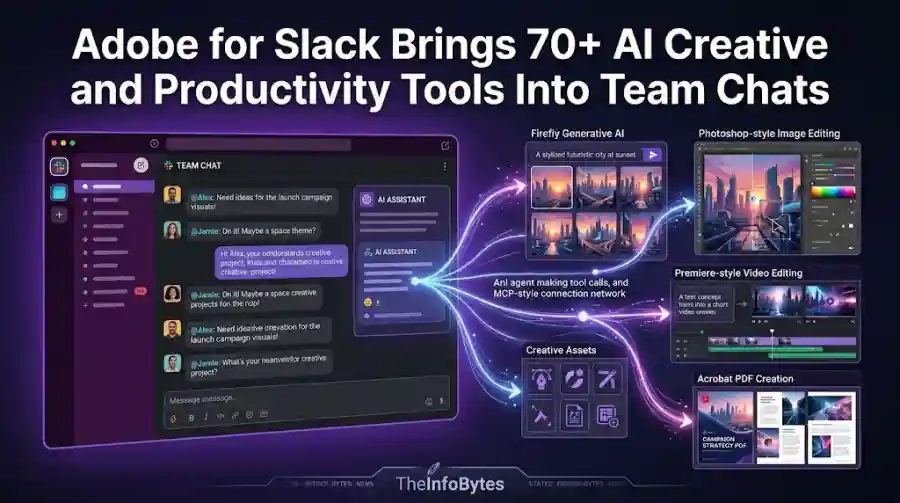
Instead of switching between Slack, Photoshop, Acrobat, Firefly and other Adobe applications, users can now ask Slackbot to call Adobe tools while working inside a conversation.
The idea is simple:
Conversation → AI understands the context → Adobe tools perform the work → Result returns to Slack
That could change how marketing, design and business teams collaborate around creative work.
What Is Adobe for Slack?
Adobe for Slack is an Adobe application designed to connect Adobe's creative and productivity tools with Slack's built-in AI assistant, Slackbot.
Adobe says the integration includes more than 70 tools from products such as:
- Photoshop
- Firefly
- Adobe Express
- Premiere
- Acrobat
- InDesign
- Illustrator
- Adobe Stock
- Lightroom
Users can describe what they want in natural language, while Slackbot can use relevant Adobe capabilities to help complete the task.
This means Slack becomes more than a place for team messaging.
It can become an interface for requesting creative work.
How Adobe for Slack Works
The workflow is built around Slackbot.
A user can open a conversation and describe the desired result.
For example, a marketing employee could ask for a campaign image based on the information already discussed in a Slack channel.
Slackbot can access relevant conversation or Canvas context and then call the Adobe app to create or transform the content.
Adobe says Slackbot can use context from:
- Conversations
- Channels
- Slack Canvases
- Shared files
- Existing Creative Cloud assets
This allows users to work from information that is already part of their project instead of copying everything into another application.
More Than 70 Adobe Tools Are Available
One of the biggest parts of the announcement is the number of Adobe capabilities being brought into Slack.
Adobe is connecting tools across its creative and document ecosystem.
Photoshop
Teams can use Photoshop capabilities for image editing and refinement.
Firefly
Firefly brings generative AI capabilities into the Slack workflow.
Adobe Express
Users can work with templates and create shareable content.
Premiere
Video-related workflows can be connected to the Adobe ecosystem.
Acrobat
Teams can create and work with documents and PDFs.
Illustrator and InDesign
Design workflows can also be connected to conversations.
Adobe Stock
Teams can search existing Adobe Stock resources as part of the creative process.
This creates a much broader integration than a simple image-generation plugin.
Turn Slack Conversations Into Creative Work
One of Adobe for Slack's most interesting features is its ability to use existing conversation context.
Imagine a marketing team discussing a product launch in Slack.
The conversation might contain:
- Product information
- Campaign goals
- Target audience
- Brand requirements
- Feedback
- Reference images
- Project deadlines
Normally, a designer might need to read the conversation, collect the relevant files and then open several Adobe applications.
With Adobe for Slack, the team can ask Slackbot to use that context to create content.
Adobe says Slackbot can summarize information from a conversation or Canvas and then ask the Adobe app to transform that context into PDFs, images and videos.
This is an example of AI moving from answering questions toward actually performing work.
Create PDFs From Information Inside Slack
Adobe for Slack can also transform information into professional documents.
For example, a team could provide a collection of files or information from a project conversation and ask Adobe to create a polished PDF.
This could be useful for:
- Client proposals
- Campaign briefs
- Product summaries
- Internal reports
- Project documents
- Presentation materials
- Marketing assets
The result can then be shared back into the Slack conversation.
That removes several steps from a traditional workflow.
Search Creative Cloud Assets Through Slack
Another useful feature is access to Creative Cloud assets.
Adobe says users can ask Slackbot to search Creative Cloud assets based on factors such as subject, style or mood.
For large creative teams, this could save significant time.
Companies often have years of accumulated creative material.
Finding the right asset can sometimes take longer than editing it.
Instead of manually browsing folders, employees can ask Slackbot to locate relevant content.
The selected asset can then be brought into the workflow for further editing.
Create Social Media Variations From Existing Content
Adobe for Slack also targets marketing teams that need to adapt content for multiple channels.
A company may already have an approved campaign image or video.
But that asset may need different dimensions or versions for different social platforms.
Adobe says users can take approved images and videos and quickly create variations sized for social channels.
This can reduce repetitive production work.
The marketing team can keep the conversation in Slack while Adobe handles the creative transformation.
Create Designs From Templates
Adobe for Slack also connects users with Adobe templates.
Teams can browse thousands of design templates, choose a suitable design, customize its copy and colors, and then create a finished asset.
The result can be animated for social media or turned into a print-ready PDF.
This could be particularly useful for employees who are not professional designers.
Instead of starting with a blank canvas, they can begin with an existing structure and use AI-assisted tools to adapt it.
Turn Spreadsheets Into Visual Content
Adobe is also connecting data with creative workflows.
Users can bring a spreadsheet into Slack and ask Adobe to transform information from it into a PDF or visual that can be shared with a team or client.
This is an important use case because business information often starts in structured formats.
For example:
Spreadsheet → AI interpretation → Visual report → Slack review
The goal is to reduce the manual steps between raw business data and a polished document.
Bulk Image Editing Comes to Slack Workflows
Adobe says users can also refine groups of images from Slack.
Examples include:
- Team headshots
- Event photos
- Product images
- Marketing assets
The integration can support operations such as removing backgrounds, removing distractions, adjusting lighting and tone, cropping and resizing.
For marketing teams working with dozens or hundreds of images, bulk editing can be a significant time saver.
Slack Becomes an Interface for Adobe AI
The deeper significance of Adobe for Slack is not simply that Adobe added another integration.
It represents a shift in how users interact with software.
Traditionally, users open Photoshop to edit an image.
They open Acrobat to work with a PDF.
They open Premiere to edit video.
They open Illustrator for vector design.
Now the starting point can be a conversation.
A user can remain in Slack and ask an AI assistant to call the appropriate Adobe tool.
That means the interface becomes less important than the underlying capability.
Adobe Is Building a Larger AI Tool Ecosystem
Adobe says Adobe for Slack is part of a broader effort to bring its creative and productivity tools into AI chatbot platforms.
The company specifically mentions integrations involving ChatGPT, Claude and Copilot, with Gemini coming soon.
This suggests Adobe does not want users to access its capabilities only through traditional Adobe interfaces.
Instead, Adobe wants its tools to become available wherever people are already using AI.
That is a major strategic shift.
The Adobe application becomes a capability that an AI assistant can call.
Why This Matters for AI Agents
The Adobe for Slack launch also connects with the broader rise of AI agents.
A traditional chatbot answers questions.
An AI agent can take action.
With Adobe for Slack, the AI can potentially:
- Understand a request.
- Read relevant Slack context.
- Identify the required Adobe capability.
- Call that capability.
- Create or modify content.
- Return the result to the team.
- Continue refining it based on feedback.
This is much closer to an agentic workflow.
The AI is not merely generating text about how to create something.
It is helping perform the actual task.
Adobe for Slack Uses MCP-Based Integration
Adobe describes the integration as an example of MCP apps in Slack.
MCP, or Model Context Protocol, provides a standardized way for AI systems to discover and interact with tools and capabilities.
This is becoming increasingly important as companies build AI agents that need to work across multiple applications.
Instead of creating a completely custom integration for every AI assistant, standardized tool interfaces can make capabilities easier for agents to discover and use.
Adobe's Slack integration therefore fits into a much larger industry movement toward AI systems that can call external software.
Security and Enterprise Access Matter
Adobe for Slack is initially available to Slack Business+ and Enterprise+ customers.
That makes the integration particularly relevant to organizations rather than only individual users.
Enterprise environments require careful control over:
- User access
- Files
- Company data
- Creative assets
- AI-generated content
- Collaboration
- Existing permissions
The integration's enterprise availability means Adobe is positioning this as a professional workflow tool rather than simply an experimental AI chatbot extension.
Organizations should still review the permissions and data-handling policies of both Slack and Adobe before deploying AI-powered workflows with confidential material.
How to Get Started With Adobe for Slack
Adobe provides a relatively simple setup process.
Users can:
- Open a direct message with Slackbot.
- Select the Apps option.
- Choose Manage Apps.
- Select Adobe.
- Continue as a guest or sign in with an Adobe account.
- Start asking Slackbot to create, edit or transform content.
Adobe says users can begin without an Adobe account, while signing in unlocks additional tools and capabilities, including access to Creative Cloud files and continuity across sessions.
Adobe for Slack vs Traditional Adobe Workflows
The biggest difference is where the workflow begins.
Traditional Workflow
Slack discussion → Download files → Open Adobe application → Edit → Export → Return to Slack → Ask for feedback → Repeat
Adobe for Slack Workflow
Slack discussion → Ask Slackbot → Adobe performs task → Review result in Slack → Refine
The second workflow reduces context switching.
That may sound like a small change, but teams can spend significant amounts of time moving between applications.
Reducing those transitions can improve productivity.
Who Will Benefit Most?
Marketing Teams
Marketing teams can create campaign assets, adapt content and generate documents directly from project discussions.
Social Media Teams
Social teams can quickly resize, modify and create variations of approved content.
Designers
Designers can locate assets and handle repetitive production tasks without leaving collaboration channels.
Sales Teams
Sales teams can turn information and spreadsheets into client-ready PDFs and visuals.
Managers
Managers can ask AI to transform project information into polished documents.
Enterprise Organizations
Large organizations can connect creative workflows to existing team communication systems.
Adobe for Slack Has One Important Limitation
Adobe for Slack does not mean Photoshop or Premiere has disappeared.
For advanced editing, Adobe still expects users to move into its dedicated applications.
Adobe explicitly says users can continue in applications such as Photoshop, Premiere, Acrobat, Express and Firefly when they need greater creative control or deeper document capabilities.
So the Slack integration should be viewed as an acceleration layer.
It handles many routine and conversational tasks.
Professional applications remain available when detailed control is required.
The Bigger Picture for AI-Powered Work
Adobe for Slack is part of a larger transformation happening across workplace software.
The old model was:
Application → User → Manual actions
The emerging model is:
User → AI agent → Multiple applications → Completed task
In this model, employees may not need to know which application performs each individual step.
They simply describe the desired outcome.
The AI coordinates the tools.
Adobe is clearly preparing for this future.
Adobe for Slack is a meaningful expansion of Adobe's AI strategy.
The company is taking its creative and productivity capabilities out of individual applications and making them accessible through a workplace conversation.
With more than 70 Adobe tools available through the integration, teams can create images, videos, PDFs, documents and marketing assets without constantly leaving Slack.
The most important part is not any single Adobe feature.
It is the workflow.
Slack becomes the place where people discuss an idea, while AI and Adobe tools help turn that idea into finished work.
As AI agents become better at using external software, this type of integration could become a standard way of working.
The future workplace may not require employees to constantly switch between applications.
Instead, employees may simply describe what they need and let AI coordinate the software required to complete it.
Key Takeaways
- Adobe for Slack launched globally on September 2, 2026.
- It is available to Slack Business+ and Enterprise+ customers.
- More than 70 Adobe creative and productivity tools are integrated.
- Supported tools include Photoshop, Firefly, Acrobat, Premiere, Express, Illustrator and InDesign.
- Slackbot can use conversations, files and Canvas information as context.
- Teams can create images, videos, PDFs and other content directly from Slack.
- Creative Cloud assets can be searched from Slack.
- Users can create social-media variations and bulk-edit images.
- Adobe is using an MCP-based approach to connect its capabilities with AI workflows.
- The integration is part of Adobe's broader strategy of bringing its tools into AI assistant platforms.
FAQs
What is Adobe for Slack?
Adobe for Slack is an integration that brings more than 70 Adobe creative and productivity tools into Slack, allowing users to create and edit content through Slackbot.
Which Adobe tools work with Slack?
Adobe says the integration includes capabilities from Photoshop, Firefly, Adobe Express, Premiere, Acrobat, InDesign, Illustrator, Adobe Stock, Lightroom and other Adobe products.