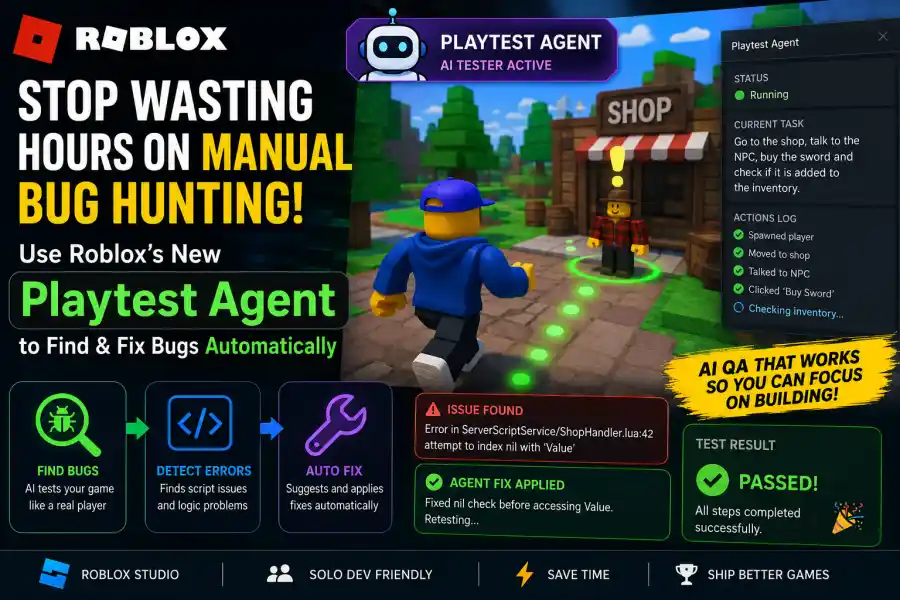
How Roblox’s New Playtest Agent Finds and Fixes Bugs Automatically
Every Roblox developer knows how tiring manual testing can be. You spend hours checking the same features again and again just to make sure everything works properly. Sometimes you repeatedly jump into a wall to see if players can glitch through it. Other times, you keep pressing a shop button over and over to make sure your DataStore saves correctly without breaking.
Creating games is exciting, but testing every small feature manually can quickly become frustrating and time-consuming.
That is why Roblox’s new Playtest Agent is becoming one of the most talked-about tools for developers in 2026.
This new AI-powered feature is part of the latest Roblox Studio Assistant and MCP updates. Instead of only helping developers write code, the Playtest Agent can actually enter your game, test features automatically, detect problems, and even help fix errors.
For solo developers and small teams, this tool could completely change the way Roblox games are tested and developed.
What Is the Playtest Agent?
The Playtest Agent is an AI testing tool built directly into Roblox Studio. You can think of it like a virtual game tester that automatically plays your game and checks whether systems are working correctly.
In normal software development, automated testing is usually simple. A program checks if a function returns the correct result. But game development is much more complicated because games involve movement, combat, inventories, shops, NPCs, quests, UI systems, and multiplayer interactions.
The Playtest Agent is designed specifically for handling these types of game systems.
When activated, the Playtest Agent can:
- Spawn a test player inside your game
- Walk around the map
- Interact with objects and buttons
- Follow instructions written in plain English
- Watch the Output window for script errors
- Check if systems are behaving correctly
- Create a report showing successful and failed tests
One of the best features is that the Playtest Agent works separately from the main Roblox Assistant. This allows it to stay focused only on testing instead of getting distracted by large amounts of code or unrelated tasks.
How to Enable the Playtest Agent
Since the Playtest Agent is still considered a newer feature, you need to enable it manually in Roblox Studio.
Here is how you can activate it:
- Open Roblox Studio
- Click on File
- Go to Beta Features
-
Find these options:
- Playtest Agent
- Studio Assistant MCP
- Enable both features
- Restart Roblox Studio
After restarting Studio, make sure the Studio Assistant is also turned on because it works together with the Playtest Agent for better testing and automation.
Why Writing Good Prompts Is Important
One of the biggest mistakes developers make with AI tools is using very unclear instructions.
For example, if you simply type:
the Playtest Agent may not understand what it should focus on. It could walk around randomly and still miss important issues.
Instead, developers should write detailed and specific prompts.
For example:Use the Playtest Agent to check if a player can pick up the Apple item, walk to the NPC named Bob, and sell the Apple for 10 Gold.”
This works much better because the AI now has a clear goal and a step-by-step process to follow.
The agent will:
- Find the Apple item
- Pick it up
- Locate the NPC named Bob
- Sell the item
- Check whether the player received 10 Gold
The more detailed your prompt is, the more accurate the testing results will be.
Creating a Self-Fixing Workflow
The most powerful part of the Playtest Agent is how it works together with Planning Mode and Studio Assistant.
This allows developers to create a self-correcting workflow where the AI can:
- Build a feature
- Test the feature
- Detect bugs
- Suggest fixes
- Retest automatically
This can save developers a huge amount of time during game development.
Step 1: Create a Plan
Imagine you are building a round-based fighting game.
You can ask the Roblox Assistant:“Create a round timer system that resets the map when the timer reaches zero.”
The Assistant will generate the required plan and code automatically.
Step 2: Test the Feature
After the system is created, you can immediately ask the Playtest Agent to test it.
For example:“Use the Playtest Agent to let the timer reach zero and check if the map resets properly.”
The AI will now test the entire system automatically without requiring manual testing.
Step 3: Fix the Problems
If something fails, the Playtest Agent will generate an error report.
For example:“MapTemplate not found in ServerStorage.”
Because the Assistant is connected through MCP, it can instantly understand the problem and suggest a fix.
After you approve the change, the AI can test the system again until everything works properly.
This creates a much faster development cycle compared to traditional manual testing.
Understanding Test Results
After each test, the Playtest Agent generates a result report.
Here are the main result types developers will see:
Pass
The test completed successfully and all expected actions worked correctly.
Fail
The agent found a script error or detected that a feature was not working properly.
Inconclusive
The AI could not complete the task or became stuck during testing. This often happens in very large or complicated maps.
Error
This usually happens when the agent reaches its action limit. Currently, Playtest Agents can only perform a limited number of actions before stopping automatically.
Even if a test says “Pass,” developers should still check the logs for warnings or unusual behavior.
Current Limitations of the Playtest Agent
Even though the Playtest Agent is very advanced, it still has some limitations.
It Cannot Play Like a Real Gamer
The AI is not very good at fast reflex gameplay.
If your game includes:
- Difficult obbies
- Fast FPS combat
- Competitive movement mechanics
the Playtest Agent may struggle with timing and reactions.
It works best for:
- Logic systems
- Shops
- Inventories
- Quests
- UI systems
- Round systems
- Data saving
It Cannot Judge Visual Quality
The Playtest Agent focuses on game systems and interactions, not graphics or design quality.
For example:
- It can tell if a button works
- But it cannot tell if the button looks ugly
- It cannot properly judge lighting or visual glitches
Human feedback is still important for visual polish and player experience.
Daily Usage Limits
Because Roblox uses cloud servers to run AI testing, there are daily usage limits for Playtest Agents.
Developers should save advanced tests for larger systems instead of small checks.
Why This Feature Matters for Roblox Developers
The Playtest Agent could completely change Roblox development over the next few years.
In the past, small developers often needed friends or testers to help find multiplayer bugs. Some problems only appeared when several players joined the same server at once.
Now AI agents can help simulate these situations automatically.
Roblox is already working on systems where multiple Playtest Agents can join the same server together. This could help developers test:
- Trading systems
- Multiplayer combat
- Matchmaking
- Team balancing
- Race conditions
For solo developers, this is almost like having a free QA team built directly into Roblox Studio.
Before using the Playtest Agent, remember these important tips.
Use Clear Object Names
Avoid naming everything:
- Part
- Button
- NPC
Instead, use clear names like:
- ShopTrigger
- QuestNPC
- MainDoor
- GoldChest
This helps the AI understand your game much more easily.
Always Read the Logs
Even when tests pass, quickly check the logs for warnings or strange behavior.
Small issues can later become serious bugs if ignored.
Combine It With External Tools
Many developers now connect Roblox Studio with editors like VS Code or Cursor using MCP bridges.
This allows them to launch Playtest Agent tests directly from their coding workspace for even faster development.
The Future of Roblox Testing
The Playtest Agent feels like the beginning of a completely new era for Roblox development.
Developers can now spend less time repeating boring manual tests and more time building creative game experiences. Instead of checking every small feature themselves, AI can handle many repetitive tasks automatically.