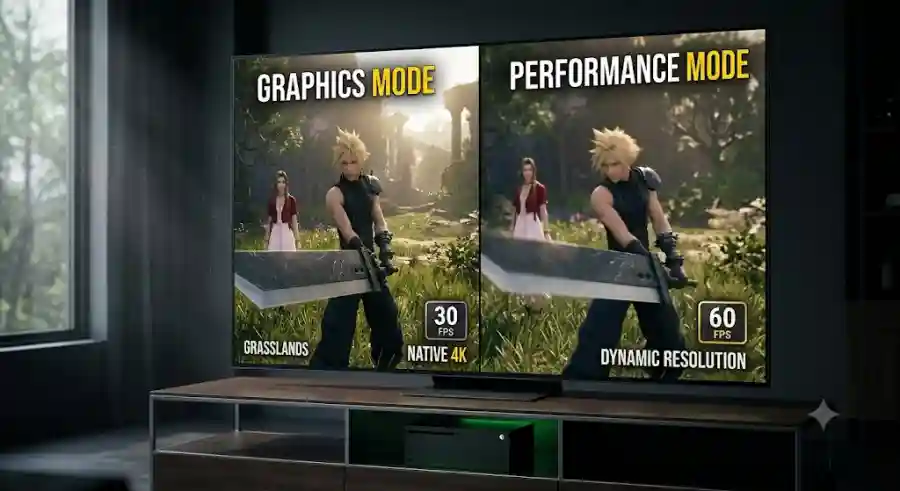
Should You Choose Graphics or Performance Mode in Final Fantasy 7 Rebirth on Xbox Series X? Complete Settings and Performance Breakdown
Let's take a detailed look at the available graphics settings, performance behavior, visual compromises, HDR recommendations, and the current best option for Xbox Series X players.
Highlights
- Final Fantasy 7 Rebirth is now available on Xbox Series X.
- Players can choose between Graphics Mode and Performance Mode.
- Graphics Mode targets a stable 30 FPS with native 4K resolution.
- Performance Mode targets 60 FPS but experiences frequent frame-rate drops.
- Visual quality is noticeably sharper in Graphics Mode.
- Performance Mode currently suffers from camera judder and VRR-related issues.
- HDR settings can significantly improve image quality when configured correctly.
- Graphics Mode currently provides the most stable overall experience.
Understanding the Two Core Graphics Options
Unlike PC games that often feature dozens of adjustable settings such as texture quality, ambient occlusion, shadow resolution, anisotropic filtering, and anti-aliasing options, the Xbox Series X version of Final Fantasy 7 Rebirth keeps things simple.
Inside the game's Display menu, players can choose between two pre-configured visual profiles:
Graphics Mode
This mode prioritizes image quality and visual fidelity.
Key targets include:
- Native 4K resolution
- Enhanced visual detail
- Maximum texture quality
- Stable 30 frames per second
Performance Mode
This mode prioritizes responsiveness and smoother gameplay.
Key targets include:
- 60 frames per second
- Reduced rendering workload
- Dynamic resolution scaling
- Faster combat responsiveness
On paper, the choice follows the standard next-generation console formula. One mode focuses on cinematic visuals, while the other aims for fluid gameplay. However, actual performance results reveal important differences that players should understand before making their decision.
Graphics Mode: The Best Way to Experience Gaia's Visual Beauty
Native 4K Presentation Delivers Outstanding Image Quality
If your primary goal is experiencing Final Fantasy 7 Rebirth at its absolute visual best, Graphics Mode immediately stands out as the superior option.
The Xbox Series X renders the game at a crisp native 4K resolution, allowing every environment, character model, and visual effect to shine. The level of clarity is immediately noticeable, especially on large 4K televisions and gaming monitors.
Cloud's outfit showcases intricate details, including stitching, metallic surfaces, and leather textures that remain impressively sharp. Character facial models look exceptionally detailed during story scenes, while environmental assets maintain excellent clarity even at significant viewing distances.
The world of Gaia benefits enormously from this presentation. Vast grasslands, rocky terrain, forests, mountains, and sprawling cities all appear richly detailed and visually immersive.
Environmental Detail Looks Exceptional
One of the biggest strengths of Graphics Mode is how well it handles environmental complexity.
Players exploring large open zones will notice:
- Dense foliage rendering
- Improved texture clarity
- Better object detail at long distances
- Reduced visual softness
- More impressive landscape vistas
Locations such as the Grasslands and Junon showcase the Xbox Series X hardware particularly well when running in Graphics Mode. Vegetation appears fuller, architecture displays greater detail, and distant scenery remains visually impressive without significant degradation.
Texture pop-in exists but remains relatively well controlled compared to what players experience in Performance Mode.
Graphics Mode Performance: Surprisingly Stable
Visual quality is only one part of the equation.
A beautiful image means little if performance feels inconsistent or distracting.
Fortunately, Graphics Mode performs remarkably well.
Stable 30 FPS Target
The game is locked to 30 frames per second in this mode, which may initially disappoint players accustomed to higher frame rates.
However, stability matters just as much as raw frame-rate numbers.
Technical analysis indicates that Graphics Mode maintains highly consistent frame pacing. This consistency prevents the uneven motion and visual jitter often associated with poorly optimized 30 FPS experiences.
While players transitioning from 60 FPS gameplay may require a short adjustment period, the smooth frame delivery helps the game feel significantly better than many older 30 FPS titles.
Cinematic Experience
Final Fantasy 7 Rebirth was built around large-scale storytelling, dramatic cinematics, and visually spectacular environments.
Graphics Mode complements that vision beautifully.
The combination of:
- Native 4K resolution
- Consistent frame pacing
- Sharp image quality
- High-detail environments
creates a cinematic presentation that feels polished and immersive throughout the adventure.
Performance Mode: Chasing 60 FPS With Noticeable Compromises
Why Performance Mode Sounds Appealing
For action RPG fans, Performance Mode appears to be the obvious choice.
Final Fantasy 7 Rebirth features fast-paced combat that encourages:
- Character switching
- Dodging attacks
- Perfect blocking
- Parrying enemy strikes
- Executing ATB abilities
- Coordinating team-based attacks
A stable 60 FPS can dramatically improve responsiveness during these encounters.
The controls feel more immediate, animations appear smoother, and combat reactions become easier to execute.
Unfortunately, the current Xbox Series X version struggles to maintain this ideal performance target.
Resolution Scaling Reduces Image Quality
To achieve higher frame rates, the game dynamically lowers its rendering resolution whenever additional performance is needed.
While dynamic resolution scaling is a common technique in modern console gaming, the visual trade-offs are noticeable in Final Fantasy 7 Rebirth.
Softer Overall Presentation
Compared to Graphics Mode, players may observe:
- Reduced image sharpness
- Softer textures
- Blurrier distant objects
- Less detailed foliage
- Lower environmental clarity
The difference becomes especially noticeable on large 4K displays.
Players who frequently switch between the two modes can immediately see how much visual detail is sacrificed in order to pursue higher frame rates.
Frame-Rate Stability Issues
The larger concern is not visual quality but performance consistency.
Frequent FPS Drops
Although Performance Mode targets 60 FPS, technical testing shows that the game frequently falls below this target.
Performance drops commonly occur during:
- Intense combat sequences
- Large-scale battles
- Foliage-heavy regions
- Dense open-world environments
- Areas with significant visual effects
Instead of maintaining a locked 60 FPS experience, the frame rate often falls into the 50 FPS range and occasionally dips into the 40s during particularly demanding situations.
This inconsistency can make gameplay feel less fluid than expected.
The Camera Judder Problem
Perhaps the most frustrating issue affecting Performance Mode is the currently reported camera judder bug.
What Is Camera Judder?
When players rotate the camera around Cloud or move through certain environments, small micro-stutters become visible.
Rather than producing perfectly smooth motion, camera movement can appear uneven and slightly jerky.
This issue becomes particularly noticeable during exploration when players frequently scan the environment.
VRR Is Not Working Properly
Normally, Xbox Series X players with Variable Refresh Rate (VRR) compatible displays could rely on VRR technology to smooth out frame-rate fluctuations.
Unfortunately, reports indicate that VRR currently fails to engage properly in Performance Mode.
Even users running:
- High-refresh-rate gaming monitors
- 120Hz displays
- Premium VRR-enabled televisions
continue experiencing frame pacing issues and camera stutter.
As a result, Performance Mode often feels less smooth than its advertised 60 FPS target suggests.
Graphics Mode vs Performance Mode Comparison
Side-by-Side Breakdown
| Feature | Graphics Mode | Performance Mode |
|---|---|---|
| Target Frame Rate | 30 FPS | 60 FPS |
| Stability | Highly Stable | Frequent Drops |
| Resolution | Native 4K | Dynamic Resolution |
| Image Quality | Extremely Sharp | Noticeably Softer |
| Texture Detail | Maximum Quality | Reduced Quality |
| Foliage Density | High | Lower |
| Distance Rendering | Strong | Reduced |
| Combat Responsiveness | Good | Better When Stable |
| Frame Pacing | Consistent | Inconsistent |
| Current Issues | No Major Problems | Camera Judder, VRR Problems |
| Overall Experience | Polished and Stable | Smoother but Less Reliable |
HDR Settings and Display Recommendations
Getting the Best HDR Experience
Regardless of which graphics mode you choose, proper HDR configuration can significantly improve visual quality.
Final Fantasy 7 Rebirth features dramatic lighting conditions that range from dark industrial facilities illuminated by Mako energy to bright outdoor regions flooded with sunlight.
Proper HDR settings help preserve detail across both extremes.
Enable HGiG When Available
If your television supports HGiG (HDR Gaming Interest Group), enabling it can improve HDR accuracy.
Recommended setup:
- Enable HGiG in your TV settings.
- Complete Xbox Series X HDR calibration.
- Allow the console to handle HDR tone mapping.
This setup often produces the most balanced image quality.
Adjust Black Levels Carefully
The game's default HDR settings work well for most displays.
However, OLED users may find some darker scenes appear overly crushed.
In those situations:
- Keep HDR sliders close to default values.
- Slightly increase black-level brightness if shadow detail becomes difficult to see.
- Avoid excessive brightness adjustments that wash out contrast.
Fine-tuning these settings can help preserve detail in caves, indoor locations, and nighttime environments.
Industry Impact and Technical Perspective
The Xbox launch of Final Fantasy 7 Rebirth represents another major step in bringing previously exclusive titles to a broader audience.
As more publishers release large-scale games across multiple platforms, optimization becomes increasingly important. Players now expect both visual excellence and high frame-rate performance, especially on premium hardware like the Xbox Series X.
The current situation highlights a challenge many developers face. Delivering native 4K visuals while maintaining a locked 60 FPS remains extremely demanding, even on today's most powerful consoles.
Square Enix has demonstrated that the Xbox Series X can deliver exceptional visual quality through Graphics Mode. However, Performance Mode clearly has room for improvement through future patches and optimization updates.
Given the developer's history of post-launch support, many players remain hopeful that future updates will address the camera judder issues, improve VRR functionality, and stabilize frame rates.
Why These Settings Matter
Choosing the right graphics mode directly affects how you experience every aspect of Final Fantasy 7 Rebirth.
Players focused on:
- Story immersion
- Visual fidelity
- Environmental exploration
- Cinematic presentation
will likely appreciate Graphics Mode.
Meanwhile, players who prioritize:
- Fast combat reactions
- Controller responsiveness
- Higher frame rates
- Competitive action timing
may still prefer Performance Mode despite its current shortcomings.
Understanding these differences allows players to tailor the experience to their preferences rather than relying solely on default settings.