Learn How to Create, Join, and Manage Free Grow a Garden 2 Private Servers for Better Farming, Zero Crop Theft and Faster Shop Restocks
Highlights
- Private servers are 100% free and require 0 Robux.
- Protect your valuable crops from nighttime theft.
- Buy legendary and rare seeds before shop stock disappears.
- Create invite-only servers for friends and guild members.
- Experience smoother gameplay with significantly less lag.
- Organize guild farming sessions without public interference.
- Easily create your own server in just a few minutes.
Why You Need a Private Server in Grow a Garden 2
Public servers certainly have their advantages. They're lively, full of players, and perfect for meeting new people. However, they also create constant competition, especially after the latest updates introduced more valuable crops, larger gardens, and competitive farming mechanics.
Private servers completely change that experience.
Let's explore why so many experienced players now prefer farming in private worlds.
1. Guaranteed Shop Restocks Without the Rush
One of the biggest challenges in Grow a Garden 2 is the limited inventory inside seed shops.
Whenever the shop refreshes, every player on the server races to purchase rare seeds before they're gone. On busy public servers, legendary items often disappear almost instantly because dozens of players are trying to buy them at the same time.
Private servers dramatically reduce this competition.
Since only you and the people you invite are shopping together, you'll finally have a realistic chance to purchase high-value seeds before the stock sells out. This makes collecting premium plants far less stressful and much more enjoyable.
2. Complete Protection from Nighttime Crop Theft
The nighttime stealing mechanic adds excitement to the game, but it can also become one of its most frustrating features.
After dark, other players can attempt to steal crops from nearby farms. Spending hours growing valuable plants only to lose them during a single night cycle can quickly ruin the experience.
Private servers solve this problem completely.
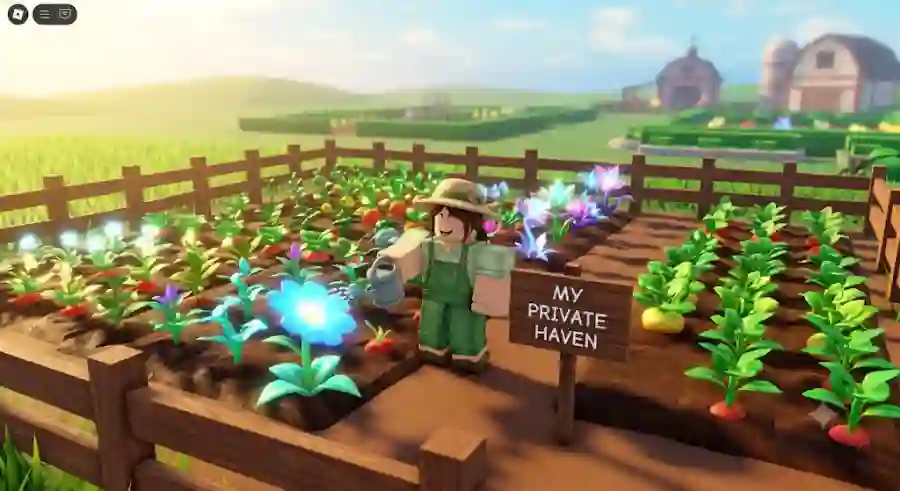
Because you decide exactly who can enter your server, random griefers cannot access your farm. If you're playing solo or only inviting trusted friends, your crops remain protected throughout every night cycle.
For players who invest significant time into building valuable gardens, this alone makes private servers worth using.
3. Better Guild Organization and Team Farming
Guilds have become an important part of Grow a Garden 2, especially for players participating in weekly competitions and cooperative events.
Trying to organize dozens of teammates inside a crowded public server can be frustrating. Players constantly disconnect, random users interrupt farming sessions, and communication becomes difficult.
Private servers provide a dedicated space where your guild can:
- Coordinate farming strategies
- Trade valuable resources
- Prepare for weekly events
- Build organized farming schedules
- Practice teamwork without outside interruptions
Having complete control over your server makes guild management much easier.
4. Smoother Gameplay with Less Lag
Performance is another major reason players switch to private servers.
Large public servers often contain hundreds of fully grown plants, oversized decorations, and dozens of active players performing actions simultaneously.
All of these elements require your device to render more objects at once.
This becomes especially noticeable on:
- Mobile phones
- Tablets
- Older PCs
- Consoles
Frame rates can drop significantly during busy periods.
Private servers reduce the number of active players and rendered objects, resulting in:
- Faster loading times
- Higher FPS
- More stable gameplay
- Smoother harvesting
- Better overall performance
If you frequently experience lag in public servers, moving to a private server can make the game feel much more responsive.
Public Servers vs. Free Private Servers
Choosing between public and private servers depends on your preferred paystyle. Here's how both options compare.
| Feature | Public Servers | Free Private VIP Servers |
|---|---|---|
| Robux Cost | Free | Free (0 Robux) |
| Player Capacity | Full public lobby | Custom or invite-only |
| Shop Competition | Extremely high; rare stock sells out quickly | Little to no competition |
| Crop Theft Risk | High during nighttime | Nearly eliminated with trusted players |
| Guild Activities | Difficult to organize | Easy coordination with friends |
| Performance | Can become laggy during busy events | Higher FPS and smoother gameplay |
| Farming Experience | Competitive | Peaceful and efficient |
For players focused on maximizing profits, protecting crops, and farming efficiently, private servers offer clear advantages.
How to Create & Host a Free Private Server
One of the best parts about Grow a Garden 2 is how simple the setup process is.
Unlike many Roblox games that require players to purchase VIP access, creating a private server here costs absolutely nothing and usually takes less than two minutes.
Follow these steps to create your own private farming world.
Step 1: Open the Official Game Page
Launch Roblox on your preferred device.
This works on:
- PC
- Mobile
- Tablet
- Console
Search for Grow a Garden 2 and open the game's official page.
Step 2: Navigate to the Servers Section
Scroll below the game description, achievements, and badges until you find the Servers tab.
This section displays both public servers and private server options.
Step 3: Select "Create Private Server"
Inside the Servers section, you'll find a button labeled Create Private Server.
Click or tap it to begin creating your own VIP world.
The process starts immediately without requiring any premium membership.
Step 4: Choose a Unique Server Name
A popup window will ask you to give your server a name.
Choose something memorable and easy to recognize.
Examples include:
- Alex's Quiet Farm
- Guild Alpha HQ
- Rare Seed Hunters
- Peaceful Harvest
- Farming Squad Base
The name helps friends identify your server quickly when joining.
Step 5: Confirm the Creation (0 Robux)
After entering your server name, Roblox displays a confirmation window.
Although the button may read "Buy Now," don't worry—the listed price is 0 Robux.
Simply confirm the action to instantly create your private server without spending any Robux.
Step 6: Configure Your Server Settings
Once your server is created, click the Configure gear icon beside its name.
Here, you'll gain complete control over who can access your world.
You can customize several important options depending on how you want to play.
Allow Friends to Join
If you'd like everyone on your Roblox friends list to join without needing individual invitations, simply enable the Allow Friends option.
This is the easiest way to create a casual farming space for your regular teammates.
Generate a Private Server Join Link
Need to invite guild members or players who aren't on your friends list?
Enable the Allow Private Server Link option.
Roblox will automatically generate a unique invite URL that you can copy and share privately with trusted players.
This feature is particularly useful for:
- Guild events
- Community farming sessions
- Rare seed hunting groups
- Trusted trading circles
Once your permissions are configured, simply click Join to enter your brand-new private server and begin farming in a peaceful, controlled environment.
How to Join Free Private Servers Hosted by Other Players
Creating your own private server is the best option if you want complete control, but not every player wants to manage a server. Many players simply want a peaceful farming environment without dealing with setup and permissions.
Fortunately, Grow a Garden 2 players can join existing private servers created by friends, guild leaders, and community members.
There are several easy ways to access these free private farming spaces.
Method 1: Join Through Direct Private Server Links
The easiest way to enter another player's private server is through a direct invitation link.
Many experienced players share their private server links with friends, guild members, or trusted community groups.
Follow these steps:
Step 1: Make Sure Roblox Is Logged In
Before opening any private server link, confirm that your Roblox account is already signed in on your browser or device.
If you're not logged in, Roblox may ask you to complete the login process before continuing.
Step 2: Open the VIP Server Invitation Link
When someone shares a Grow a Garden 2 private server link with you, simply click it.
The link automatically connects to Roblox and identifies the specific private server instance.
Step 3: Launch Roblox and Enter the Server
Roblox will ask permission to open the application if you're using a browser.
After launching, you will be transferred directly into that private server.
This method is especially useful when joining:
- Friends' farming worlds
- Guild headquarters
- Community events
- Trading sessions
Method 2: Find Private Servers Through the Official Discord Community
One of the safest places to discover active Grow a Garden 2 private servers is through the official Discord community.
Gaming communities often use Discord as the main communication platform for sharing updates, organizing events, and connecting players.
Inside the community server, look for channels such as:
- #private-servers
- #vip-links
- #guild-recruitment
These channels usually contain invitations from players who are actively hosting farming sessions.
Trusted hosts often share servers designed for:
- Peaceful farming
- Faster shop restocks
- Guild activities
- Trading groups
- Beginner-friendly gameplay
Using community-shared links is generally safer than joining random servers because established communities usually have rules against toxic behavior and griefing.
Method 3: Join Through Roblox Server History
Once you have entered a private server at least one time, Roblox saves that connection under your account history.
This means you don't always need the original invitation link.
To return later:
- Open the Grow a Garden 2 game page.
- Select the Servers section.
- Scroll down until you find My Private Servers or Servers I Belong To.
- Select the private server you previously joined.
- Click Join.
This feature makes returning to your favorite farming location quick and convenient.
For players who regularly farm with the same group, this saves time and avoids searching for links repeatedly.
Private Server Etiquette: Rules Every Player Should Follow
Private servers create a more relaxed and controlled environment, but they still depend on player cooperation.
Whether you're joining a friend's server or a community-hosted farming world, following basic etiquette helps maintain a positive experience.
Breaking server rules can result in being removed or permanently losing access.
1. Respect Shop Restocks and Share Resources
One of the biggest reasons players use private servers is easier access to valuable seeds.
However, that does not mean one person should purchase everything instantly.
Avoid buying the entire seed inventory immediately.
Good private server behavior includes:
- Leaving rare seeds for other players
- Allowing teammates a chance to shop
- Communicating before taking limited items
- Supporting group farming goals
A private server works best when everyone benefits.
2. Follow Nighttime Farming Rules
Night cycles are one of the most important mechanics in Grow a Garden 2 because stealing becomes possible.
Some private server hosts allow stealing as part of gameplay, while others create strict no stealing environments.
Always respect the host's rules.
If a server is designed as a peaceful farming area, stealing another player's crops can quickly damage trust and result in removal from the server.
3. Avoid Inviting Random Players Without Permission
Private servers are created to maintain control over who enters.
Sharing invitation links publicly without asking the owner can create problems.
A sudden wave of unknown players can:
- Increase server lag
- Create unnecessary conflicts
- Disrupt farming sessions
- Break community trust
Before sharing any private server link, always ask the host first.
4. Keep Communication Friendly
Private servers are often created as an escape from the chaos of public servers.
Players usually join these spaces because they want:
- Relaxed farming
- Friendly conversations
- Cooperative gameplay
- Helpful teammates
Avoid unnecessary arguments, spam, or negative behavior.
A positive community makes Grow a Garden 2 much more enjoyable.
Frequently Asked Questions (FAQ)
Can I Get Banned for Creating or Using a Free Grow a Garden 2 Private Server?
No.
Private servers are an official Roblox feature supported by the platform and the developers of Grow a Garden 2.
Creating, hosting, or joining a private server does not violate Roblox rules.
Players can safely use private servers for:
- Personal farming
- Friend groups
- Guild activities
- Community events
As long as players follow Roblox's community guidelines, private servers remain completely safe.
Why Does My Private Server Say "Server Full" or "Unable to Join"?
Sometimes players may receive messages such as:
- Server Full
- Unable to Join
- Connection Failed
This usually happens because the private server has reached its maximum player capacity.
If this occurs, you can:
- Wait until another player leaves
- Ask the host to remove inactive players
- Try another active private server link
Busy community servers can fill quickly, especially during major updates or events.
Does My Garden Progress Carry Between Public and Private Servers?
Yes.
Your important game progress automatically saves to your Roblox account.
This includes:
- Garden progress
- Sheckles
- Inventory items
- Plant growth
- Crop collection
- Other saved gameplay data
You can freely switch between public and private servers without losing your progress.
Your farm remains connected to your account, not a specific server.
How Many Private Servers Can I Create in Roblox?
Roblox allows users to maintain up to 100 active private servers across all games.
If you reach your limit, you can manage your account by removing old or inactive private servers.
Deleting unused servers creates space for new ones.
For most Grow a Garden 2 players, one or two well-managed private servers are usually more than enough.
Industry Impact: Why Free Private Servers Are Changing Roblox Farming Games
The rise of free private servers represents a major shift in how players experience Roblox games.
Traditionally, VIP servers were often considered premium features because developers charged monthly Robux fees for private access.
However, games like Grow a Garden 2 show that free private environments can improve player satisfaction by giving users more control.
Modern Roblox players increasingly want:
- Less frustrating gameplay
- More customization
- Better performance
- Safer communities
- Cooperative experiences
Private servers directly answer these demands.
Instead of forcing every player into crowded public spaces, developers are allowing communities to create their own smaller gaming environments.
This approach also helps build stronger player communities because friends and guilds can organize without outside interference.
Why Free Private Servers Matter in Grow a Garden 2
Grow a Garden 2 is built around patience, strategy, and long-term progression.
Players spend hours:
- Growing rare plants
- Collecting resources
- Expanding farms
- Improving their gardens
- Preparing for events
Because of this investment, losing progress or valuable crops due to random server problems can be frustrating.
Private servers provide a better balance between competition and relaxation.
They allow players to enjoy the creative side of farming without constantly worrying about:
- Fast competitors buying all the seeds
- Random players stealing crops
- Public server lag
- Unorganized gameplay
For competitive players, private servers improve efficiency.
For casual players, they create a peaceful farming experience.
For guilds, they provide a dedicated headquarters.