Catalog Avatar Creator TikTok Build Stunning Roblox Outfit Layouts That Drive Views, Saves and Engagement
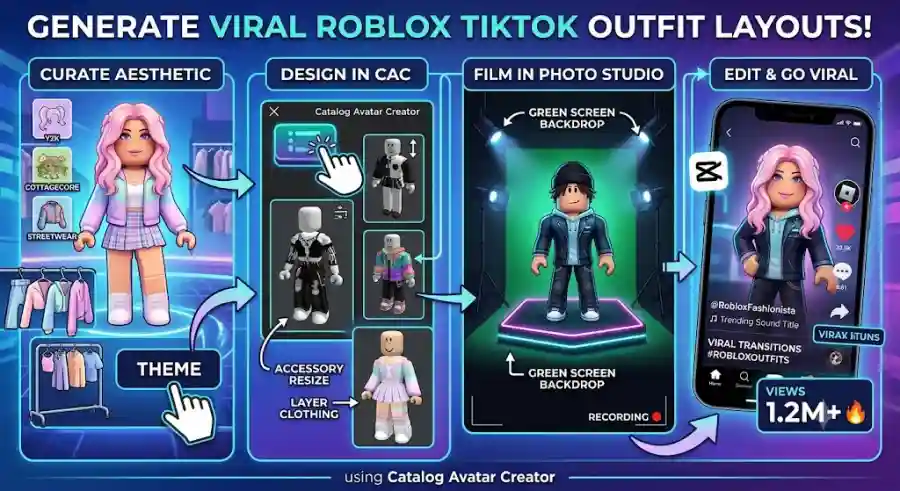
Whether your goal is to showcase your personal style, build an audience around Roblox fashion, share outfit inspiration, or capitalize on the ever-popular outfit layout trend, this guide will walk you through the complete process of creating viral TikTok outfit layouts using Catalog Avatar Creator.
Highlights
What You'll Learn
- Why Catalog Avatar Creator performs so well on TikTok
- How to choose aesthetics that attract viewers
- Creating professional-quality Roblox outfits
- Using CAC's Photo Studio effectively
- Recording smooth outfit transition videos
- Editing footage for maximum engagement
- Leveraging outfit IDs and community features
- Strategies for increasing saves, shares, and watch time
Why Catalog Avatar Creator Is a Goldmine for TikTok Content
Before diving into the creation process, it helps to understand why Catalog Avatar Creator consistently produces content that performs exceptionally well on TikTok.
The platform's success isn't accidental. It aligns perfectly with the types of content that TikTok users actively search for, save, and share.
Access to Endless Fashion Possibilities
One of the biggest advantages of Catalog Avatar Creator is the sheer variety available to creators.
Instead of purchasing countless items before experimenting, users can browse through millions of UGC accessories, clothing pieces, hairstyles, animations, layered clothing options, and limited items. This allows creators to test dozens of outfit combinations before deciding which styles deserve a place in their final videos.
The result is virtually unlimited content potential.
A single creator can produce:
- Y2K-inspired fashion collections
- Cyberpunk outfit showcases
- Cute aesthetic compilations
- Anime-inspired character recreations
- Streetwear lookbooks
- Fantasy avatar concepts
- Seasonal fashion trends
- Luxury limited-item combinations
Because trends change rapidly on TikTok, having access to endless customization options gives creators a significant advantage.
Built-In Tools Designed for Content Creation
Many Roblox experiences focus exclusively on gameplay. Catalog Avatar Creator takes a different approach.
The game includes specialized tools designed specifically for visual presentation, including:
- Photo Studio environments
- Custom lighting controls
- Background customization
- Camera positioning tools
- Accessory adjustment systems
- Outfit-saving functionality
These features dramatically reduce the time required to produce high-quality content.
High Save and Share Potential
TikTok's algorithm rewards content that encourages interaction.
Roblox outfit videos naturally generate engagement because viewers frequently want to recreate what they see. When users save a video to copy outfit IDs later or share it with friends, engagement signals increase.
This creates a powerful feedback loop where valuable outfit content continues reaching new audiences.
Step 1: Choose the Right Aesthetic Before Building
Why Themes Matter
One of the most common mistakes new creators make is randomly combining clothing items without a clear vision.
Successful TikTok outfit layouts usually revolve around a strong visual identity.
When viewers instantly understand the style being presented, they are more likely to watch the entire video and engage with it.
Instead of creating unrelated outfits, focus on a specific theme.
Popular Roblox Outfit Trends Right Now
Y2K and Cyberpunk
These styles continue generating strong engagement across Roblox TikTok.
Common characteristics include:
- Futuristic accessories
- Neon highlights
- Dark color palettes
- Metallic details
- Tech-inspired designs
- Layered streetwear pieces
The visual contrast works exceptionally well in short-form video formats.
Cottagecore and Soft Aesthetic
Soft aesthetic content remains incredibly popular among Roblox fashion communities.
Typical features include:
- Pastel color schemes
- Cute hairstyles
- Nature-inspired accessories
- Cozy clothing combinations
- Gentle visual themes
These outfits often perform well because they appeal to a broad audience.
Chibi and Blocky Avatar Styles
Creative avatar scaling has become a trend of its own.
Many creators use smaller avatar proportions to create:
- Cute miniature characters
- Stylized fashion displays
- Unique visual perspectives
- Distinctive content that stands out in crowded feeds
Cosplay and Fandom Content
Another consistently successful category involves recreating recognizable characters from:
- Anime series
- Popular games
- Movies
- Internet culture
- Trending entertainment franchises
These videos benefit from both Roblox audiences and broader fandom communities.
Match Outfits to Trending Audio
A valuable strategy used by experienced creators is aligning fashion styles with trending sounds.
If a specific TikTok audio is becoming popular, think about the mood it creates.
Ask yourself:
- Does it feel futuristic?
- Is it playful and cute?
- Does it have an edgy vibe?
- Does it evoke nostalgia?
Matching outfit aesthetics to music creates stronger emotional connections and improves viewer retention.
Step 2: Build Stunning Outfits Inside Catalog Avatar Creator
Once you've identified your aesthetic direction, it's time to start creating.
Browse and Mix Clothing Creatively
Catalog Avatar Creator's search tools make it easy to locate specific items.
Use filters to search by:
- Color
- Category
- Style
- Creator
- Item type
Experimentation is essential.
Many viral outfits combine unexpected pieces that initially seem unrelated but work perfectly together.
Try mixing:
- Layered accessories
- Multiple clothing elements
- Hair combinations
- Face accessories
- Unique animations
The goal is creating something memorable.
Take Advantage of Advanced Accessory Editing
One of Catalog Avatar Creator's most powerful features is its advanced customization system.
Unlike standard Roblox avatar editing, CAC allows users to:
- Resize accessories
- Rotate items
- Move pieces freely
- Adjust positioning precisely
- Create custom visual effects
This flexibility enables creators to build outfits that look significantly more polished than standard avatar combinations.
For example:
A hat that sits awkwardly in the default position can be resized and repositioned to fit perfectly. Hair accessories can be layered more naturally. Decorative elements can be aligned for a cleaner final appearance.
Small adjustments often create the biggest visual improvements.
Save Every Finished Outfit
Organization becomes increasingly important as your content library grows.
Once an outfit is complete:
- Save it immediately.
- Use clear naming conventions.
- Group similar aesthetics together.
- Create multiple variations.
This allows you to switch outfits instantly during recording sessions.
For a strong TikTok outfit layout video, aim to create between three and five distinct outfits built around the same theme.
This creates visual variety while maintaining consistency.
Step 3: Use the CAC Photo Studio Like a Professional Creator
Why Photo Studio Changes Everything
Many beginners simply record standard gameplay footage.
Unfortunately, gameplay environments often contain distractions that reduce visual quality.
The Photo Studio solves this problem.
By providing a controlled environment, it allows creators to focus attention entirely on the avatar and outfit details.
Entering the Studio
Inside Catalog Avatar Creator, click the Photo Studio button to access a private customizable space specifically designed for visual content creation.
This area functions almost like a professional photography studio.
Optimize Your Background
Solid Color Backgrounds
For creators planning to edit backgrounds later, solid colors work best.
Recommended choices include:
- Bright green
- Neon green
- Bright blue
These colors simplify chroma key editing in applications like CapCut.
Minimalist Backgrounds
If you prefer a clean aesthetic without additional editing, consider:
- Soft pastel colors
- Pure white backgrounds
- Deep black environments
- Neutral tones
Minimalist backgrounds often make outfit details stand out more effectively.
Adjust Lighting and Shadows
Lighting can dramatically affect perceived quality.
Experiment with:
- Light intensity
- Light angle
- Shadow strength
- Environmental brightness
Enabling realistic shadows instantly adds depth and realism.
Many successful Roblox fashion creators rely heavily on shadow settings because they make avatars appear more dimensional and visually appealing.
Professional-looking lighting often separates average content from viral content.
Create Cinematic Camera Angles
Camera movement plays a major role in viewer engagement.
Use CAC's camera controls to capture:
- Close-up accessory details
- Full-body outfit reveals
- Slow pans
- Rotating showcase shots
- Dramatic zoom effects
These techniques make videos feel more polished and intentional.
Step 4: Record Smooth Outfit Transitions
Why Transitions Matter
TikTok users consume content quickly.
Smooth transitions help maintain attention and create satisfying visual moments that encourage rewatches.
The most successful outfit videos often feel seamless.
The Outfit Change Method
This is one of the most popular techniques among Roblox TikTok creators.
How It Works
- Place your avatar in the center of the Photo Studio.
- Start screen recording.
- Trigger an emote.
- While the animation continues, instantly load another saved outfit.
- Repeat with multiple outfits.
During editing, cut precisely at the moment the outfit changes.
The result appears as an instantaneous transformation that feels smooth and professional.
These transitions often become the highlight of the video.
The Lineup Method
Another effective approach involves showcasing multiple outfits simultaneously.
Creators can:
- Display front views
- Show side profiles
- Include rear angles
- Arrange avatars into grid-style layouts
- Showcase complete collections
This format works particularly well when presenting themed outfit packs or fashion compilations.
Step 5: Edit for TikTok Algorithm Success
Creating great outfits is only half the process.
Editing determines whether viewers stay or scroll away.
Fortunately, free tools such as CapCut and InShot provide everything needed to transform raw footage into engaging TikTok content.
Create a Strong Hook
The first two seconds are critical.
Start with:
- Your best outfit
- The most detailed avatar
- A dramatic transition
- A compelling text overlay
Examples include:
- "Steal These Roblox Y2K Outfits"
- "Best Outfit IDs This Week"
- "Aesthetic Roblox Fits You Need"
- "Outfits Everyone Is Copying"
An effective hook immediately tells viewers why they should keep watching.
Sync Cuts to Music
Music synchronization remains one of the strongest engagement boosters on TikTok.
Align outfit transitions with:
- Beat drops
- Instrument changes
- Vocal moments
- Sound effects
When transitions match the rhythm perfectly, viewers often watch multiple times.
Higher replay rates can significantly improve performance.
Export High-Quality Video
Quality matters.
For best results:
- Export in 1080p
- Use 60fps
- Maintain sharp visuals
- Avoid excessive compression
Smooth playback creates a more professional viewing experience and can improve audience retention.
Add Valuable Information
One of the easiest ways to increase engagement is providing actionable value.
Consider including:
- Outfit IDs
- Accessory IDs
- Style names
- Creator usernames
- Community Creator profile information
When viewers want to save or screenshot information, engagement metrics naturally increase.
This behavior often signals quality to the TikTok algorithm.
Industry Impact: How Catalog Avatar Creator Changed Roblox Fashion Content
Catalog Avatar Creator has become far more than a shopping and avatar customization experience.
It has helped create an entire creator economy around Roblox fashion.
Thousands of content creators now use CAC to:
- Produce outfit showcases
- Share styling tutorials
- Create trend analyses
- Highlight UGC items
- Build personal fashion brands
The experience has effectively become a bridge between Roblox creativity and social media content creation.
As Roblox fashion continues expanding, tools like CAC are playing an increasingly important role in shaping digital self-expression and creator culture.
Why This Matters for Aspiring Roblox Creators
The demand for Roblox fashion content continues growing.
Users constantly search for:
- New outfit ideas
- Trending styles
- Avatar inspiration
- UGC recommendations
- Fashion tutorials
Catalog Avatar Creator provides an accessible way to meet that demand without requiring advanced technical skills.
Anyone with creativity, consistency, and an understanding of trends can build an audience around Roblox fashion content.
The barrier to entry remains remarkably low compared to many other content categories.